

up-to-date
Wat is er nieuw bij ROGER365.io
Ontdek de nieuwste ROGER365.io-updates, nieuwe functies en andere interessante informatie die je productiviteit verhogen, repetitief werk verminderen en je dag makkelijker, sneller en leuker maken.




Vul dit formulier in om een gesprek met Michael aan te vragen!
Discover the latest ROGER365.io updates, new features and other interesting information that boost productivity, reduce repetitive work, and make your day easier, faster, and more rewarding.

Welcome back. After a summer release freeze, September marks the start of a new cycle of updates, improvements and new capabilities for ROGER365.io. We have used the quieter months to invest in the platform, our documentation and the content we provide to help you get the most out of your investment.
This month we are shining a spotlight on three features that deserve a closer look. Whether you missed them earlier this year or are still exploring everything ROGER365.io has to offer, these are capabilities that can make a real difference in daily operations.
Prefer to watch rather than read? We recorded a short walkthrough of this month'shighlights. You can find it just below.
Here are September's highlights:
On top of that: a better way to find answers
We spent the summer building something we have wanted to give you for a long time: a proper, structured documentation area at docs.roger365.io.

The knowledge base is organised around both ROGER365.io platforms. The Xtend documentation covers the Contact Center and Attendant Console in full, including queues, routing, call flows, wallboards, reporting and integrations. The UnifAI documentation covers the second-generation Attendant Console with everything admins and users need for deployment, configuration and daily use.
Whether you are an admin setting up a new feature, an agent looking for a quick answer or an IT team onboarding a new deployment, the documentation is now the place to start. We will keep adding to it as the platform grows.
And one more thing: keep an eye on the events calendar under Resources. New webinars are being scheduled for the coming weeks and this is where you will see them first. We hope to see you there.

Finally know whether your queues are performing, before your customers tell you otherwise
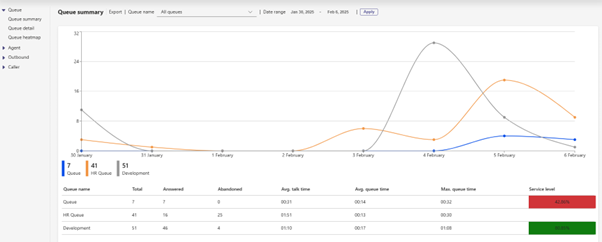
Queue Service Level gives supervisors and managers a clear, configurable performance indicator for every queue in ROGER365.io. You define what good looks like: set a target answer time in seconds and a threshold percentage, and the platform continuously shows whether your team is meeting that standard. No manual calculations, no end-of-day surprises.
The service level indicator is visible on the supervisor page for live monitoring and on the queue summary in the reporting tab for trend analysis over time.
Why it matters for you
The benefit
Service level is one of the most direct measures of customer experience in a contact centre. When you can see it clearly, configure it precisely and monitor it in real time, you move from reacting to missed targets to actively managing them. Queue Service Level turns a metric that used to live in spreadsheets into a live operational tool, keeping teams aligned, customers served on time and management informed.
On the supervisor page the following is be visable:

On the reporting tab the level is displayed on the queue summary page:
Everything an agent needs to know, in one place, before they need to ask
Every second an agent spends switching between screens or asking a customer to repeat themselves is a second that erodes both efficiency and trust. Agent Assist eliminates that friction by bringing the full picture of a customer interaction directly into the Microsoft Teams interface, automatically, during every call or chat.
It is not just a contact card. Agent Assist combines live CRM data, interaction history, AI-generated summaries, call classifications and a complete customer timeline into a single configurable view that appears the moment an interaction begins.
Why it matters for you
The benefit
Agent Assist turns knowledge into speed. When agents have the right information at exactly the right moment, they handle interactions with more confidence, make fewer transfers and leave customers with the impression that your organisation genuinely knows them. The reduction in screen switching and manual lookup translates directly into shorter handling times and more consistent service quality across the entire team.
The reporting layer your contact centre decisions deserve
Understanding what is happening in your contact centre is one thing. Being able to act on it with confidence is another. The Insights and Analytics Module brings advanced, interactive reporting to ROGER365.io through Microsoft Power BI, giving operations managers, team leads and leadership a clear, structured view of performance across calls, queues and agents.
The module sits alongside the native reporting in the agent app and is designed for the moments when you need more depth: trend analysis, comparisons over time, and the kind of drill-down that turns data into decisions.
Why it matters for you
The benefit
Most contact centres collect more data than they ever act on. The Insights and Analytics Module changes that by making your contact centre data accessible, visual and actionable. When managers can see performance clearly, they can coach more effectively, staff more accurately and explain results with confidence. That is the difference between reporting and real insight.
The module consists of multiple reports and here you'll find a few of them:
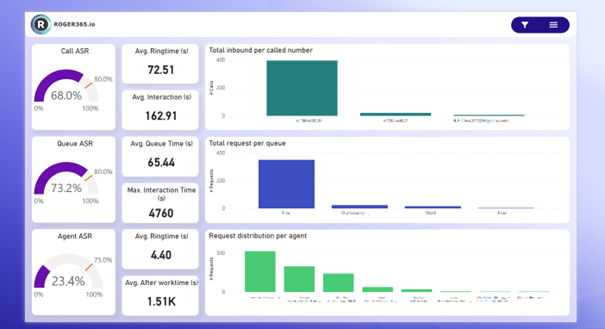
Dashboard
This page offers a comprehensive overview of key performance indicators (KPIs) for the Contact Center. You can view metrics such as total calls, answer rates, average interaction time, and average ring time, helping to monitor the overall performance of the Contact Center.
Calls Summary
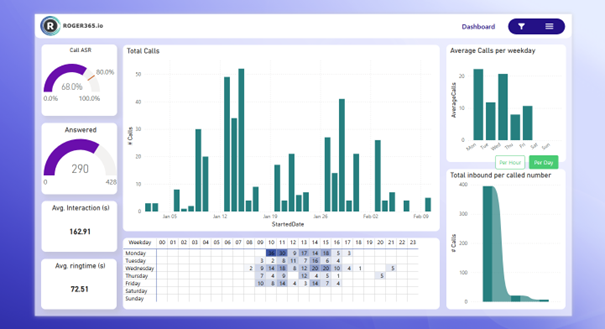
This page provides an overview of all call-related metrics, including answered calls, average interaction times, and the overall call answer-seizure ratio (ASR). It offers insights into the total number of calls handled, as well as detailed breakdowns of call volumes over specific time periods. This page is essential for tracking call center performance and identifying trends in call handling efficiency.
Calls Volume Analysis
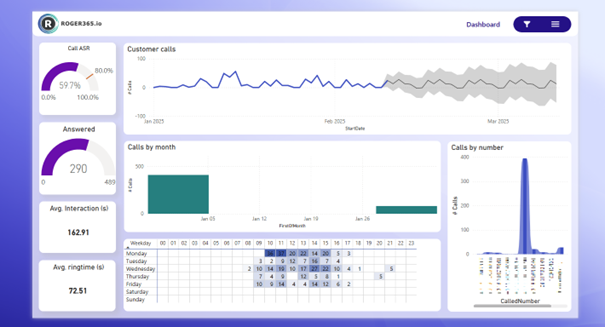
This page analyzes call volume patterns by different timeframes. It provides insights into call distribution across weekdays, as well as detailed breakdowns of calls by specific numbers, offering an understanding of peak call times and trends
This module is available as an add-on on our Business and Enterprise subscriptions. You can find the full description on our documentation page: https://doc.roger365.io/documentation/configuration/insights-analytics/
June brings three meaningful additions that make ROGER365.io work more seamlessly with the tools and workflows your teams already rely on. Thank you as always for your feedback and your trust in the platform; it continues to guide every decision we make.
This month is about reducing friction at the moments that matter most: smoother handovers between agents, shift management that runs on autopilot, and a contact centre that actually uses the customer data sitting in your CRM. Less manual work, more context, better service.
Here are June's highlights:
See you at Commsverse 2026
This summer we will be at Commsverse 2026 in the UK, one of the leading events for Microsoft Teams and unified communications professionals. It is a great opportunity to see the platform live, explore what is on the roadmap and speak directly with the people who build it. Get your tickets at Commsverse 2026
If you are attending, we would love to connect. Come and find us at our stand, share your thoughts, ask your questions and let us show you what is coming next. We genuinely hope to see and speak to many of you there.
Park a call, pass the context, pick it up without missing a beat
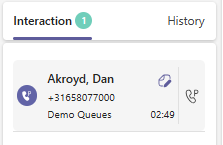
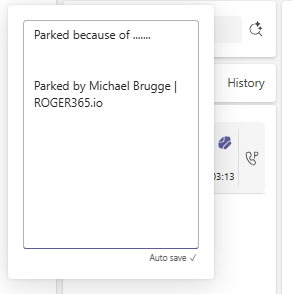
Agents can now park a call in a shared slot so that they or a colleague can pick it up at the right moment. No blind transfers, no keeping two agents tied up in a consultative hold. Before parking, the agent adds a short note to the call so whoever picks it up knows exactly what it is about before they even say hello. Admins set up Call Park groups and control which agents belong to each one.
Why it matters for you
The benefit
Call Park reduces friction at exactly the moments when calls are most likely to go wrong. Fewer wrong transfers means fewer call-backs, less time repeating the same information and more issues solved on the first call. For teams where calls regularly move between roles, this turns a small daily annoyance into a quiet but real improvement in both agent experience and customer satisfaction.
Your shift schedule and your queues, finally in sync automatically
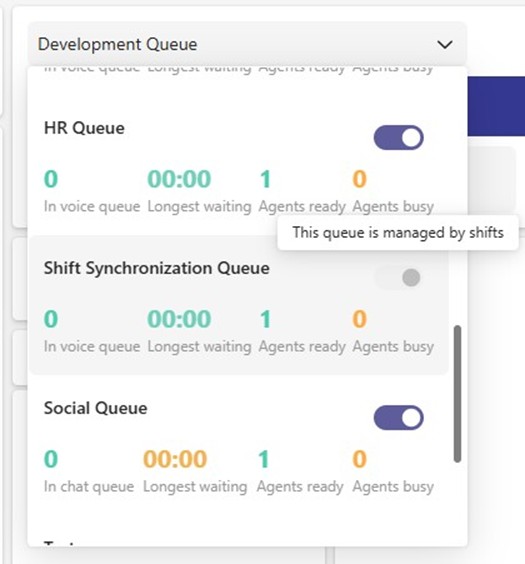
Shift Sync connects Microsoft Teams Shifts directly to ROGER365.io voice queues. When an agent's shift starts, they are automatically signed in to their assigned queue. When it ends, they are signed out again. During an active shift, neither the agent nor a supervisor can manually override the sign-in status, so the queue always reflects reality. Microsoft Teams Shifts stays the single place where schedules are planned and managed.
Why it matters for you
The benefit
Service levels are most often broken at the edges of the day, when someone forgot to log in at opening or stayed signed in past their shift. Shift Sync closes that gap automatically. For operations and leadership, this means fewer abandoned calls at peak moments, more predictable service levels and less supervisor time spent on schedule policing. It also puts the Microsoft 365 tools the business already pays for to work in the contact center, instead of running two systems in parallel by hand.
Know your customer before the call even starts
CRM Replicator connects your CRM to ROGER365.io and puts it to work in two powerful ways. Before an agent picks up, they already see who is calling: name, phone number, company and any other details pulled from your CRM. At the same time, call flows can use that same CRM data to make smarter routing decisions, playing audio prompts in the customer's preferred language, pushing VIP accounts to the top of the queue or routing to the right team based on segment, region or account owner.
Why it matters for you
The benefit
Knowing the customer before the call starts shortens handle times, raises first-call resolution and makes every interaction feel more personal. Smarter routing based on CRM data sends the right call to the right place the first time, which lifts both service levels and customer satisfaction. For operations and leadership, CRM Replicator turns the CRM from a separate system into an active part of the contact centre. The investment already made in your CRM data starts paying off on every single inbound call.

May brings a set of updates that extend the reach of ROGER365.io across channels, sharpen agent experience and deepen the Microsoft ecosystem integration. Thank you for the continued feedback and engagement, it keeps this platform moving in the right direction.
This month we are opening up new proactive outreach capabilities, giving admins finer control over routing behaviour and adding Microsoft Copilot as a first-class contact channel alongside all the social messaging channels you already use.
Here are May's highlights
Beyond features, we have also been investing in content that helps you get more out of ROGER365.io. We are currently working on adding more reference cases and a dedicated use-cases section, with the goal to inspire you and your team on how to extract even more value from the platform. We will keep you posted as those go live.
Here is to another month of smarter conversations, better reach and a stronger Microsoft-powered experience with ROGER365.io.
Reach out first, on the channel customers always check
SMS in ROGER365.io is now a true two-way channel. Agents working in Social Queues can send outbound SMS messages directly from their interface, not just reply to inbound ones. Every outbound conversation is tracked as a single queue item, recorded against the contact and reported alongside all other interaction data. No separate tools, no fragmented records.
Why it matters for you
The benefit
SMS has open rates well above email. Turning it into a proactive outbound channel inside ROGER365.io means every message is logged, queued and measured against the same service levels as inbound interactions. For operations and leadership, that means more structured outreach, measurable engagement and a single source of truth for every customer conversation.

AI-powered first contact, seamlessly connected to your queues
Microsoft Copilot is now a native TouchPoint in ROGER365.io, sitting alongside Webchat, WhatsApp, SMS, Facebook, Email and API. Customers interact with a Copilot agent and those conversations are routed into ROGER365 queues exactly as any other social channel would be. When the flow requires a human, handover to a live agent is seamless and the full conversation context travels with it.
Why it matters for you
The benefit
Deflecting routine enquiries to a Copilot agent frees live agents for higher-value work, while seamless handover keeps the customer experience consistent throughout. For organisations already invested in Microsoft, the Copilot TouchPoint turns that investment into direct contact center capacity. More questions answered at a lower cost per interaction, with every conversation visible in the reporting your business already trusts.
A smarter cooldown so agents are ready when it counts
Admins can now configue what happens to an agent's status the moment they decline a call invite. Set the status to Not Ready after a decline and the agent is briefly removed from the routing pool. A configurable auto-recovery timer then flips them back to Ready automatically after a set number of seconds, with no manual status change needed from the agent.
Why it matters for you
The benefit
Small routing behaviours have outsized effects on agent wellbeing and call outcomes. Preventing the system from immediately re-routing to an unready agent means fewer declines overall, fewer mis-routed calls and less pressure on the floor. The auto-recovery timer gives admins a tuneable cooldown that improves service quality without relying on agents to manually manage their own status throughout the day.
As we wrap up an exciting year, the entire ROGER365.io team wants to wish you a happy and successful New Year!
We’re incredibly grateful for your trust and partnership throughout the past year. 2026 is shaping up to be another big one packed with innovative updates and powerful improvements across our platform. Our mission remains the same: to help you create seamless, intelligent customer experiences directly within Microsoft Teams.
And there’s more starting this January, we’ll be sharing monthly “What’s New” updates, giving you clear insights into the latest features, enhancements, and behind-the-scenes improvements we’re working on.
Here’s to a year full of innovation, collaboration, and great conversations.
From all of us at ROGER365.io, happy New Year!
The Wallboard feature has received new widget: Classification
This widget allows to track assigned Classifications during Voice and/or Social interactions. It gives helpful insight on how often agents are classifying their interactions with the customer and helps with tracking trends of specific Queue(s).
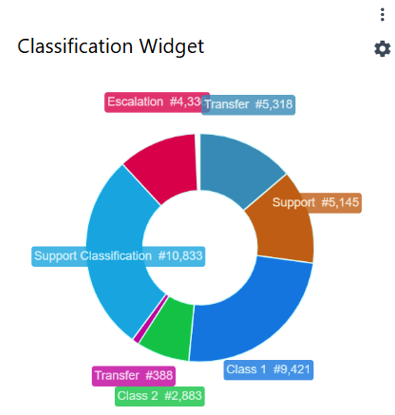
You can define how far back the Classification widget should look for data, how many classification items can be shown (the “Top N classifications” option),and the maximum number of characters to display for each classification label.
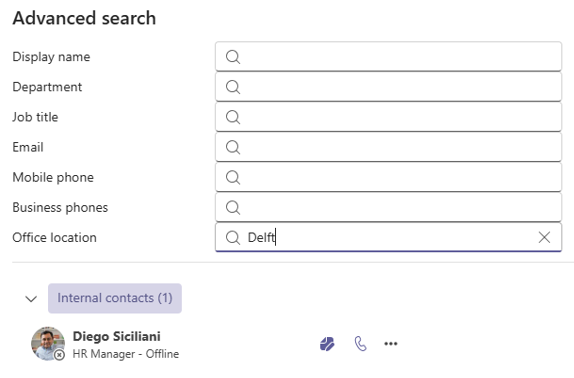
The Advanced Search feature has been enhanced with additional search property: Office location.
The Office location data comes from the user properties of Microsoft Entra ID (Active Directory) tenant, that means the office location set in Microsoft Teams won’t be taken into consideration while searching for specific contact.
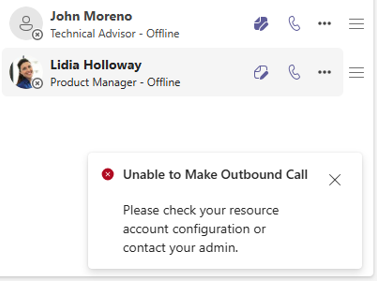
Up until now, agents using the Contact Center application were not directly notified when an outbound call failed, which could lead to confusion about whether the application was functioning correctly.
To address this,we have introduced a general notification that informs agents whenever an outbound call attempt fails.
As we move into the final stretch of the year, November has been a month full of exciting updates, smart improvements, and a continued focus on enhancing the ROGER365.io experience. In this edition we’ll walk you through the latest product updates.. Whether you’re a partner, customer, or simply curious about what’s new, here’s everything you need to know to stay ahead.
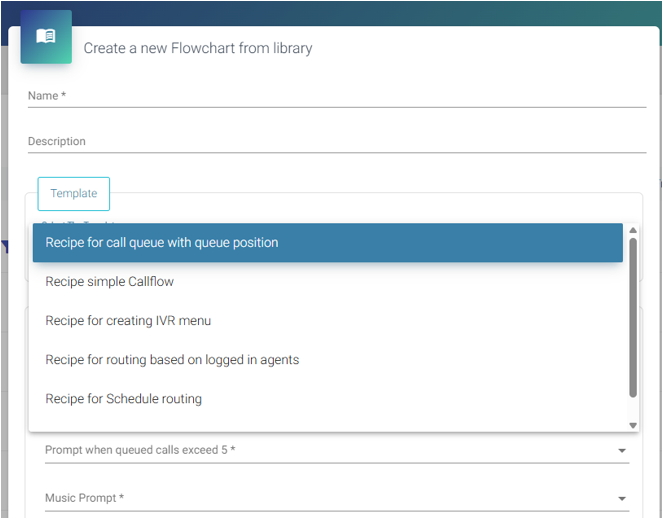
A nice new addition for ROGER365.io admins: we’ve added Template Callflows to accelerate onboarding and experimentation. These predefined callflows can be used out of the box, helping engineers explore product capabilities and expand their knowledge efficiently.
In the admin portal, select Contact Center | Callflows, then choose "+ Add flowchart from library". Here, you'll find the available templates:
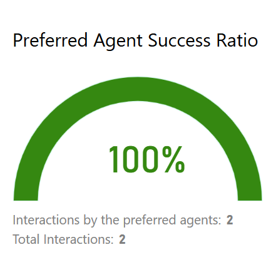
The Wallboard feature has received two new widgets:
This widget displays the percentage of interactions that were successfully routed to the same agent as in previous sessions. Below the main metric, you can find the total number of voice interactions, as well as the number handled by preferred agents.
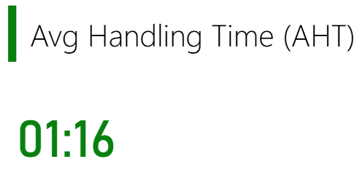
The other new widget displays the average handling time (in minutes) for the selected voice queues. It helps quickly identify operational bottlenecks and ensure that agents handle interactions efficiently.
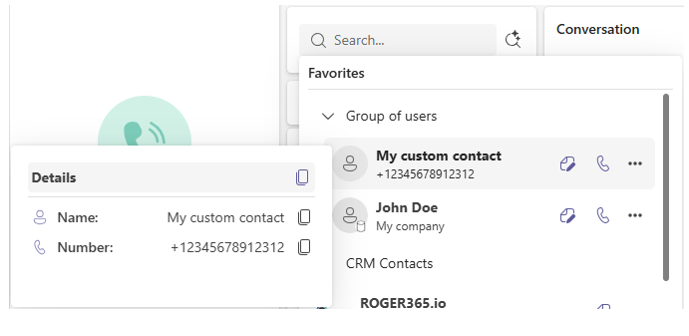
We’ve added the option to copy details of CRM or custom contacts. This new feature makes it easier and faster to work with contact information and helps improve your overall workflow.
Hover your mousepointer over the avatar icon to display the contact details. You’ll then see a copy button, which you can use to copy a single detail or all details at once:
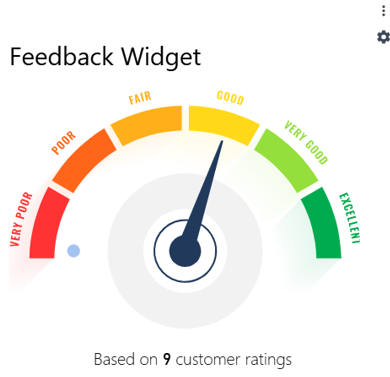
This new widget provides real-time insight into customer satisfaction by displaying the average post-call feedback score (on a 1–5 scale) gathered through DTMF input for selected Voice Queues. Ideal for wallboards and live dashboards, it helps contact centers monitor service quality at a glance and track how customers rate their experience after each call.
The full customer journey, right when you need it
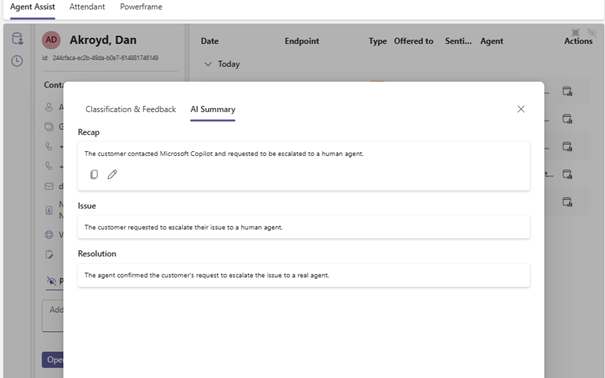
Agents can now see the complete story of a voice interaction before they even say hello. The Customer Timeline in Agent Assist shows routing decisions, queues the caller passed through, transfers, agent hunts, call classifications and AI-generated summaries including a Recap, Issue, Resolution and Narrative. Admins can enable this per Agent Assist profile, giving full control over who sees it.
Why it matters for you
The benefit
When agents have the full picture from the start, customers feel heard instead of frustrated. Full journey visibility reduces unnecessary transfers, shortens handling time and raises the quality of every conversation. It is the context agents always needed, now delivered automatically.
Live contact centre data on any screen, no setup required
ROGER365.io now includes a fully built-in, widget-based Wallboard. Build your own layout by selecting and arranging the live data widgets you need, then publish it to a unique URL. Open that URL in any browser, on a second monitor, on a shared screen in the team area, or on a TV mounted on the wall. If it has a browser, it can show your wallboard.
Why it matters for you
Operations and facility managers can display live performance in any room across the building.
The benefit
A URL-based wallboard requires zero infrastructure and creates a culture of transparency where performance is visible to the whole team, not just those logged into a reporting tool. Real-time awareness drives faster reactions to queue build-ups, reduces the need for supervisor intervention and helps teams self-manage throughout the day.
Your most-used actions, one click away
Every agent works differently. Now ROGER365.io works the way you do. You can pin the call actions you use most, like transfer, add note or callback, and arrange them in any order you like. The layout is saved per agent, so your workspace is always ready the moment you take a call.
Why it matters for you
The benefit
Personalised action buttons reduce friction at the exact moment it matters most. For a team of 20 agents handling 50 calls a day, eliminating even two or three unnecessary clicks per interaction translates into real time savings every week, and a noticeably calmer experience for both agents and customers.
April brings another set of meaningful updates that help agents work faster, supervisors see more and teams stay better connected. Thank you for continuing to share your feedback, it directly shapes where we focus our energy each month.
This month's improvements are all about control, visibility and context. Agents get a more personal workspace, supervisors get live performance on any screen, and every agent handling a voice call gets the full customer journey right in front of them.
Here are April's highlights:
Here is to another month of smarter tools, smoother conversations and better experiences for both your team and your customers with ROGER365.io.
See exactly how agents handle interactions
The Insights & Analytics module now includes a dedicated Agent Actions page. This new report gives a clear view of the actions agents take during and after conversations.
Why it matters for you
The benefit
Better visibility leads to better performance. With detailed action tracking, you can improve coaching, ensure compliance and highlight best practices all within your existing Power BI dashboards.

Keep important customer details in one place
Agents can now save notes directly on a contact and choose whether they are personal or shared with the team. Notes stay linked to the contact, so the information is always available for the next interaction.
Why it matters for you
The benefit
Important customer information is never lost again. Shared notes improve collaboration and handovers, while personal notes help agents deliver more personal and efficient conversations.

Incoming chats go straight to the right agent
Social messages from channels like webchat and WhatsApp can now be assigned to agents automatically. No more waiting for someone to manually pick them from the queue.
Why it matters for you
The benefit
Auto assignment reduces delays, shortens first response times and keeps conversations moving. It ensures every message lands with an available agent right away, improving both team efficiency and customer satisfaction.
Instant clarity for very WhatsApp and webchat conversation
Agents can now see an AI‑generated summary of any social messaging conversation. Instead of scrolling through long threads, you get a clear, structured overview right when you need it.
Why it matters for you
The benefit
Faster context leads to shorter handling times and fewer repeated questions for customers. It creates smoother chat experiences and boosts customer satisfaction on WhatsApp, webchat and other social channels.
March brings another set of impactful updates that make everyday work in ROGER365.io smoother, smarter and more connected. Thank you for the ongoing feedback and enthusiasm, it continues to guide how we refine the platform for agents, supervisors and admins alike.
This month’s improvements focus on giving teams better context, faster responses and clearer insight into how interactions are handled across channels. From AI-powered summaries to deeper analytics, these additions help you deliver more consistent, personal and efficient customer experiences inside Microsoft Teams.
Here are March’s highlights:
Here’s to another month of streamlined workflows, better collaboration and smarter conversations with ROGER365.io.
Set up routing scenarios in seconds
You now have access to pre-built callflow templates that make it easy to set up common routing scenarios. Instead of building every flow from scratch, administrators can start from proven templates and customize them with the Graphical Call Flow Editor.
Why it matters for you
What problem it solves
Creating callflows manually takes time and requires expertise. Mistakes in complex routing can lead to inconsistent behavior and delayed deployments.
The benefit
Templates turn time-consuming configuration work into a quick setup. This reduces deployment costs, speeds up go‑lives, and ensures best practices are used across the organization. Common scenarios that used to take hours can now be implemented in just a few seconds.
Stay informed with in-app notifications
A new News button is now available in the Contact Center application. It gives you direct access to updates, announcements, and important information about new features and changes.
Why it matters for you
What problem it solves
Distributing updates through email or fragmented channels limited visibility. As a result, new capabilities and workflow improvements were not always adopted in time, leaving business value and ROI unrealized.
The benefit
The News button brings important messages into the application itself. This improves awareness, reduces support questions, and shortens training time. When users know what is new and why it matters, they work more confidently and productively, which leads to a better experience for both employees and customers.
Add whole teams to Favorites with one click
You can now add every member of a group to your Favorites list instantly. After searching for a group in the Contact Center application, a new button labeled Add users to favorites appears. One click moves the entire group into your Favorites so you no longer need to add contacts one by one.
Why it matters for you
What problem it solves
Adding contacts individually was slow and discouraged agents from organizing their Favorites, especially when teams were large.
The benefit
This feature saves time, improves collaboration, and reduces customer wait times. A team of ten members used to require ten separate actions. Now it takes only one click to keep your Favorites organized and ready for fast responses.
Customer details at a glance with faster ways to take action
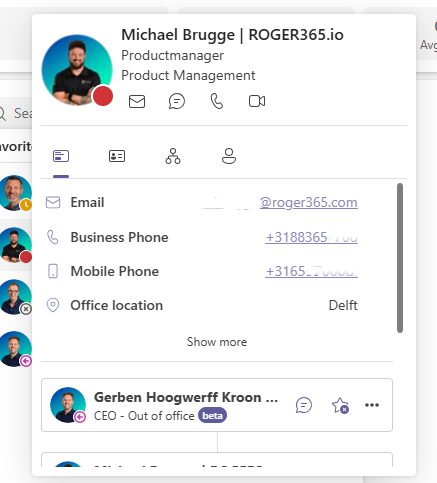
The contact card has been redesigned to present customer information more clearly and make it easier to act during live interactions. Agents now see a cleaner layout with quick-action buttons for email, phone numbers, Teams chat, video calls, and office location. The card also shows a list of the contact's direct peers to give agents extra context.
Why it matters for you
What problem it solves
Older contact cards could feel cluttered, which slowed agents down when they needed to verify details or reference customer info during a call.
The benefit
One-click communication speeds up handling time and reduces unnecessary navigation between applications. Seeing peer contacts helps agents reach the right person quickly, resulting in shorter wait times and a higher chance of solving requests on the first attempt.
A clearer, faster way to see what matters
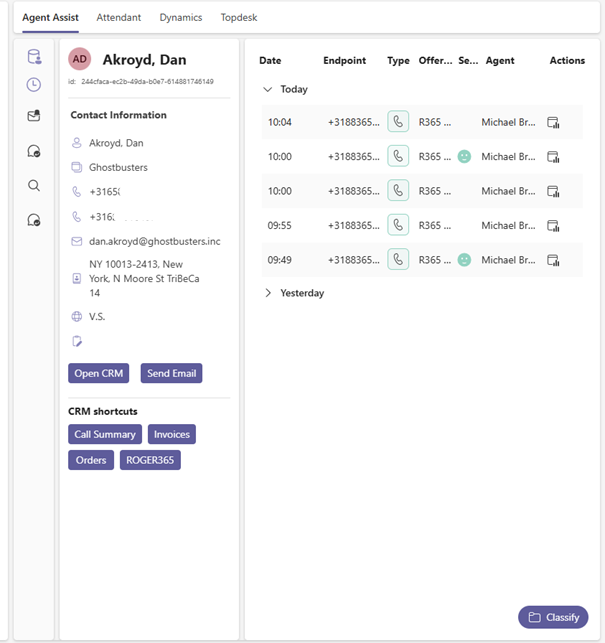
The Agent Assist panel has been redesigned to make key customer information easier to read and act on during live interactions. The refreshed layout helps agents quickly scan CRM details, past interactions, classifications, and insights. All without losing focus on the customer!
Why it matters for you
What problem it solves
The old layout could feel busy, making it harder to quickly find important customer details, especially during fast-paced conversations.
The benefit
A streamlined design reduces cognitive load, speeds up access to customer info, and supports shorter handling times. Better visibility leads to more personal conversations and higher first‑call resolution.
Smarter categorization, less manual work
Quickly understand what your customer interactions are about, without lifting a finger. The new AI Classification action automatically labels every call or message based on the conversation itself. No more manual tagging, no more inconsistent data.
Why it matters for you
What problem it solves
Manual tagging was slow, inconsistent, and easy to forget leading to gaps in reporting and unclear trends. Automated classification ensures every interaction is captured correctly, every time.
The benefit
Better insights, faster workflows, and more accurate reporting helping you improve service quality, optimize queues, and spot issues before they grow.
February brings another strong set of improvements that make working in ROGER365.io faster, smarter and even more intuitive. Thank you for the great feedback on our first monthly update. Your input continues to shape how we refine the platform for agents, supervisors and admins.
This month focuses on clearer insights, simpler workflows and more intelligent automation to help every user deliver better customer and employee experiences directly in Microsoft Teams.
Here are February’s highlights:
Here is to another month of innovation and smoother conversations with ROGER365.io
