up-to-date
What's new on ROGER365.io
Discover the latest ROGER365.io updates, new features and other interesting information that boost productivity, reduce repetitive work, and make your day easier, faster, and more rewarding.




Fill in this form to request a call with Michael!
Discover the latest ROGER365.io updates, new features and other interesting information that boost productivity, reduce repetitive work, and make your day easier, faster, and more rewarding.

This month brings sharper control and clearer visibility to your supervisor toolkit. Thank you to our community for the feedback that continues to shape these updates.
October's focus is on giving supervisors the tools to manage teams and monitor performance in real time.
Here are October's highlights:
Here is to another month of sharper oversight with ROGER365.io.

No more surprise supervisors, just clear and honest coaching
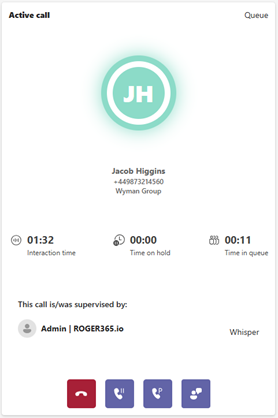
Supervisors can now choose to show up by name in an agent's call roster when they monitor, whisper or join a live call. A new 'Show supervisor in roster' setting lets administrators decide whether that presence is visible, so it can match how your contact centre likes to coach.
Monitor, whisper and join explained
Why it matters for you
The benefit
This gives contact centers the choice between transparent coaching and silent quality checks, without needing workarounds. Teams that value open coaching can build more trust between agents and supervisors. Those who prefer discreet monitoring keep that option too, so the same tool supports different training philosophies.
See how every queue is performing, before customers start complaining
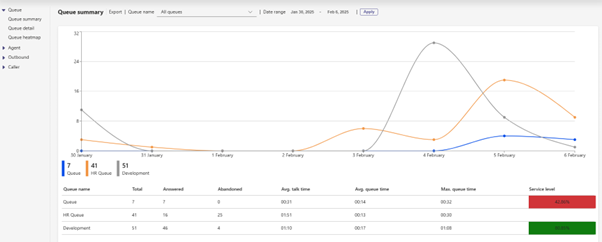
Queue Service Level Monitoring lets you set a clear target for each queue, like answering 80% of calls within 20 seconds. The system then tracks performance against that target automatically, so you always know where things stand.
Why it matters for you
The benefit
No more relying on gut feel or generic call stats to judge queue performance. Teams can see exactly which queues meet their targets and which don't, and act on it straight away. That means shorter wait times for customers, smarter staffing decisions, and clear proof for clients and management that service level agreements are being met.

Update agent skills the moment they change, no waiting on IT
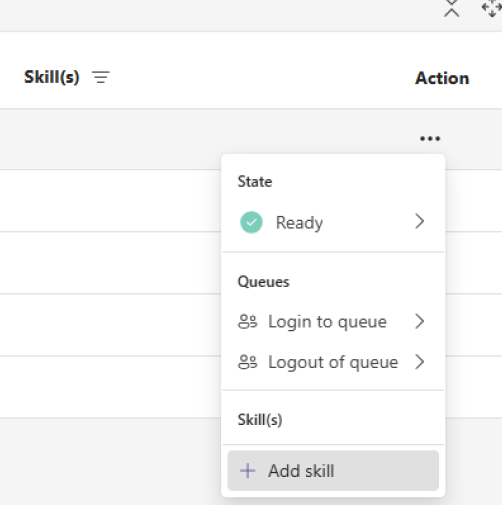
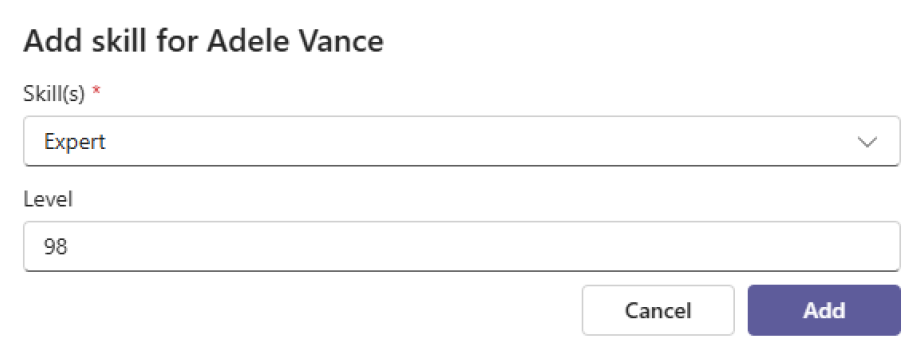
Supervisors can now add or remove agent skills straight from the supervisor dashboard. There is no need to open a separate admin panel or send a request and wait for someone else to action it.
What are agent skills?
Agent skills are labels that describe what an agent can handle, such as a language, a product or a type of question. The contact center uses these skills to route each call to an agent who has the right expertise.
Why it matters for you
The benefit
Quicker skill updates mean calls reach the right agent faster, especially when demand shifts or a specialist skill is suddenly needed. Supervisors no longer wait on another team to make routine changes, which cuts delays and administrative back-and-forth. The result is better call routing, shorter waits for customers needing specific expertise, and a smoother day-to-day for everyone involved.
Welcome back. After a summer release freeze, September marks the start of a new cycle of updates, improvements and new capabilities for ROGER365.io. We have used the quieter months to invest in the platform, our documentation and the content we provide to help you get the most out of your investment.
This month we are shining a spotlight on three features that deserve a closer look. Whether you missed them earlier this year or are still exploring everything ROGER365.io has to offer, these are capabilities that can make a real difference in daily operations.
Prefer to watch rather than read? We recorded a short walkthrough of this month'shighlights. You can find it just below.
Here are September's highlights:
On top of that: a better way to find answers
We spent the summer building something we have wanted to give you for a long time: a proper, structured documentation area at docs.roger365.io.

The knowledge base is organised around both ROGER365.io platforms. The Xtend documentation covers the Contact Center and Attendant Console in full, including queues, routing, call flows, wallboards, reporting and integrations. The UnifAI documentation covers the second-generation Attendant Console with everything admins and users need for deployment, configuration and daily use.
Whether you are an admin setting up a new feature, an agent looking for a quick answer or an IT team onboarding a new deployment, the documentation is now the place to start. We will keep adding to it as the platform grows.
And one more thing: keep an eye on the events calendar under Resources. New webinars are being scheduled for the coming weeks and this is where you will see them first. We hope to see you there.
Finally know whether your queues are performing, before your customers tell you otherwise
Queue Service Level gives supervisors and managers a clear, configurable performance indicator for every queue in ROGER365.io. You define what good looks like: set a target answer time in seconds and a threshold percentage, and the platform continuously shows whether your team is meeting that standard. No manual calculations, no end-of-day surprises.
The service level indicator is visible on the supervisor page for live monitoring and on the queue summary in the reporting tab for trend analysis over time.
Why it matters for you
The benefit
Service level is one of the most direct measures of customer experience in a contact centre. When you can see it clearly, configure it precisely and monitor it in real time, you move from reacting to missed targets to actively managing them. Queue Service Level turns a metric that used to live in spreadsheets into a live operational tool, keeping teams aligned, customers served on time and management informed.
On the supervisor page the following is be visable:
On the reporting tab the level is displayed on the queue summary page:
Everything an agent needs to know, in one place, before they need to ask
Every second an agent spends switching between screens or asking a customer to repeat themselves is a second that erodes both efficiency and trust. Agent Assist eliminates that friction by bringing the full picture of a customer interaction directly into the Microsoft Teams interface, automatically, during every call or chat.
It is not just a contact card. Agent Assist combines live CRM data, interaction history, AI-generated summaries, call classifications and a complete customer timeline into a single configurable view that appears the moment an interaction begins.
Why it matters for you
The benefit
Agent Assist turns knowledge into speed. When agents have the right information at exactly the right moment, they handle interactions with more confidence, make fewer transfers and leave customers with the impression that your organisation genuinely knows them. The reduction in screen switching and manual lookup translates directly into shorter handling times and more consistent service quality across the entire team.
The reporting layer your contact centre decisions deserve
Understanding what is happening in your contact centre is one thing. Being able to act on it with confidence is another. The Insights and Analytics Module brings advanced, interactive reporting to ROGER365.io through Microsoft Power BI, giving operations managers, team leads and leadership a clear, structured view of performance across calls, queues and agents.
The module sits alongside the native reporting in the agent app and is designed for the moments when you need more depth: trend analysis, comparisons over time, and the kind of drill-down that turns data into decisions.
Why it matters for you
The benefit
Most contact centres collect more data than they ever act on. The Insights and Analytics Module changes that by making your contact centre data accessible, visual and actionable. When managers can see performance clearly, they can coach more effectively, staff more accurately and explain results with confidence. That is the difference between reporting and real insight.
The module consists of multiple reports and here you'll find a few of them:
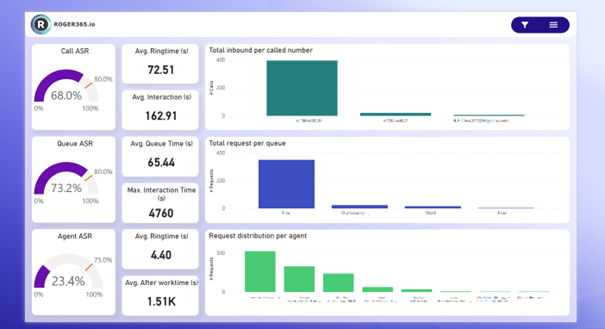
Dashboard
This page offers a comprehensive overview of key performance indicators (KPIs) for the Contact Center. You can view metrics such as total calls, answer rates, average interaction time, and average ring time, helping to monitor the overall performance of the Contact Center.
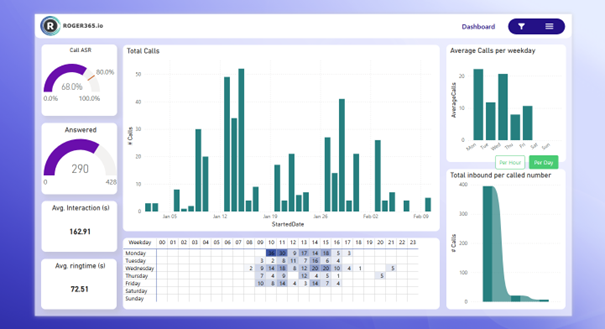
Calls Summary
This page provides an overview of all call-related metrics, including answered calls, average interaction times, and the overall call answer-seizure ratio (ASR). It offers insights into the total number of calls handled, as well as detailed breakdowns of call volumes over specific time periods. This page is essential for tracking call center performance and identifying trends in call handling efficiency.
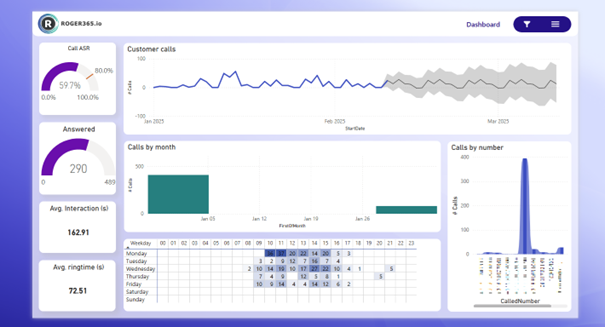
Calls Volume Analysis
This page analyzes call volume patterns by different timeframes. It provides insights into call distribution across weekdays, as well as detailed breakdowns of calls by specific numbers, offering an understanding of peak call times and trends
This module is available as an add-on on our Business and Enterprise subscriptions. You can find the full description on our documentation page: https://doc.roger365.io/documentation/configuration/insights-analytics/
June brings three meaningful additions that make ROGER365.io work more seamlessly with the tools and workflows your teams already rely on. Thank you as always for your feedback and your trust in the platform; it continues to guide every decision we make.
This month is about reducing friction at the moments that matter most: smoother handovers between agents, shift management that runs on autopilot, and a contact centre that actually uses the customer data sitting in your CRM. Less manual work, more context, better service.
Here are June's highlights:
See you at Commsverse 2026
This summer we will be at Commsverse 2026 in the UK, one of the leading events for Microsoft Teams and unified communications professionals. It is a great opportunity to see the platform live, explore what is on the roadmap and speak directly with the people who build it. Get your tickets at Commsverse 2026
If you are attending, we would love to connect. Come and find us at our stand, share your thoughts, ask your questions and let us show you what is coming next. We genuinely hope to see and speak to many of you there.
Park a call, pass the context, pick it up without missing a beat
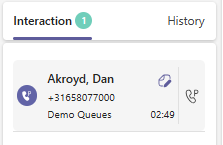
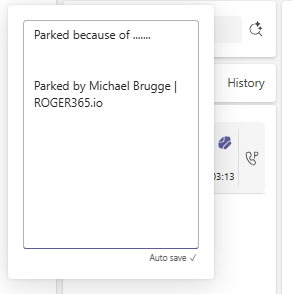
Agents can now park a call in a shared slot so that they or a colleague can pick it up at the right moment. No blind transfers, no keeping two agents tied up in a consultative hold. Before parking, the agent adds a short note to the call so whoever picks it up knows exactly what it is about before they even say hello. Admins set up Call Park groups and control which agents belong to each one.
Why it matters for you
The benefit
Call Park reduces friction at exactly the moments when calls are most likely to go wrong. Fewer wrong transfers means fewer call-backs, less time repeating the same information and more issues solved on the first call. For teams where calls regularly move between roles, this turns a small daily annoyance into a quiet but real improvement in both agent experience and customer satisfaction.
Your shift schedule and your queues, finally in sync automatically
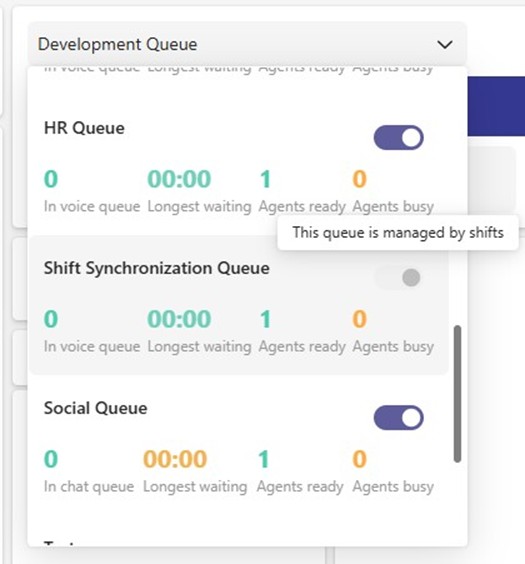
Shift Sync connects Microsoft Teams Shifts directly to ROGER365.io voice queues. When an agent's shift starts, they are automatically signed in to their assigned queue. When it ends, they are signed out again. During an active shift, neither the agent nor a supervisor can manually override the sign-in status, so the queue always reflects reality. Microsoft Teams Shifts stays the single place where schedules are planned and managed.
Why it matters for you
The benefit
Service levels are most often broken at the edges of the day, when someone forgot to log in at opening or stayed signed in past their shift. Shift Sync closes that gap automatically. For operations and leadership, this means fewer abandoned calls at peak moments, more predictable service levels and less supervisor time spent on schedule policing. It also puts the Microsoft 365 tools the business already pays for to work in the contact center, instead of running two systems in parallel by hand.
Know your customer before the call even starts
CRM Replicator connects your CRM to ROGER365.io and puts it to work in two powerful ways. Before an agent picks up, they already see who is calling: name, phone number, company and any other details pulled from your CRM. At the same time, call flows can use that same CRM data to make smarter routing decisions, playing audio prompts in the customer's preferred language, pushing VIP accounts to the top of the queue or routing to the right team based on segment, region or account owner.
Why it matters for you
The benefit
Knowing the customer before the call starts shortens handle times, raises first-call resolution and makes every interaction feel more personal. Smarter routing based on CRM data sends the right call to the right place the first time, which lifts both service levels and customer satisfaction. For operations and leadership, CRM Replicator turns the CRM from a separate system into an active part of the contact centre. The investment already made in your CRM data starts paying off on every single inbound call.

May brings a set of updates that extend the reach of ROGER365.io across channels, sharpen agent experience and deepen the Microsoft ecosystem integration. Thank you for the continued feedback and engagement, it keeps this platform moving in the right direction.
This month we are opening up new proactive outreach capabilities, giving admins finer control over routing behaviour and adding Microsoft Copilot as a first-class contact channel alongside all the social messaging channels you already use.
Here are May's highlights
Beyond features, we have also been investing in content that helps you get more out of ROGER365.io. We are currently working on adding more reference cases and a dedicated use-cases section, with the goal to inspire you and your team on how to extract even more value from the platform. We will keep you posted as those go live.
Here is to another month of smarter conversations, better reach and a stronger Microsoft-powered experience with ROGER365.io.
Reach out first, on the channel customers always check
SMS in ROGER365.io is now a true two-way channel. Agents working in Social Queues can send outbound SMS messages directly from their interface, not just reply to inbound ones. Every outbound conversation is tracked as a single queue item, recorded against the contact and reported alongside all other interaction data. No separate tools, no fragmented records.
Why it matters for you
The benefit
SMS has open rates well above email. Turning it into a proactive outbound channel inside ROGER365.io means every message is logged, queued and measured against the same service levels as inbound interactions. For operations and leadership, that means more structured outreach, measurable engagement and a single source of truth for every customer conversation.

A smarter cooldown so agents are ready when it counts
Admins can now configue what happens to an agent's status the moment they decline a call invite. Set the status to Not Ready after a decline and the agent is briefly removed from the routing pool. A configurable auto-recovery timer then flips them back to Ready automatically after a set number of seconds, with no manual status change needed from the agent.
Why it matters for you
The benefit
Small routing behaviours have outsized effects on agent wellbeing and call outcomes. Preventing the system from immediately re-routing to an unready agent means fewer declines overall, fewer mis-routed calls and less pressure on the floor. The auto-recovery timer gives admins a tuneable cooldown that improves service quality without relying on agents to manually manage their own status throughout the day.
AI-powered first contact, seamlessly connected to your queues
Microsoft Copilot is now a native TouchPoint in ROGER365.io, sitting alongside Webchat, WhatsApp, SMS, Facebook, Email and API. Customers interact with a Copilot agent and those conversations are routed into ROGER365 queues exactly as any other social channel would be. When the flow requires a human, handover to a live agent is seamless and the full conversation context travels with it.
Why it matters for you
The benefit
Deflecting routine enquiries to a Copilot agent frees live agents for higher-value work, while seamless handover keeps the customer experience consistent throughout. For organisations already invested in Microsoft, the Copilot TouchPoint turns that investment into direct contact center capacity. More questions answered at a lower cost per interaction, with every conversation visible in the reporting your business already trusts.
April brings another set of meaningful updates that help agents work faster, supervisors see more and teams stay better connected. Thank you for continuing to share your feedback, it directly shapes where we focus our energy each month.
This month's improvements are all about control, visibility and context. Agents get a more personal workspace, supervisors get live performance on any screen, and every agent handling a voice call gets the full customer journey right in front of them.
Here are April's highlights:
Here is to another month of smarter tools, smoother conversations and better experiences for both your team and your customers with ROGER365.io.
Your most-used actions, one click away
Every agent works differently. Now ROGER365.io works the way you do. You can pin the call actions you use most, like transfer, add note or callback, and arrange them in any order you like. The layout is saved per agent, so your workspace is always ready the moment you take a call.
Why it matters for you
The benefit
Personalised action buttons reduce friction at the exact moment it matters most. For a team of 20 agents handling 50 calls a day, eliminating even two or three unnecessary clicks per interaction translates into real time savings every week, and a noticeably calmer experience for both agents and customers.
Live contact centre data on any screen, no setup required
ROGER365.io now includes a fully built-in, widget-based Wallboard. Build your own layout by selecting and arranging the live data widgets you need, then publish it to a unique URL. Open that URL in any browser, on a second monitor, on a shared screen in the team area, or on a TV mounted on the wall. If it has a browser, it can show your wallboard.
Why it matters for you
Operations and facility managers can display live performance in any room across the building.
The benefit
A URL-based wallboard requires zero infrastructure and creates a culture of transparency where performance is visible to the whole team, not just those logged into a reporting tool. Real-time awareness drives faster reactions to queue build-ups, reduces the need for supervisor intervention and helps teams self-manage throughout the day.
The full customer journey, right when you need it
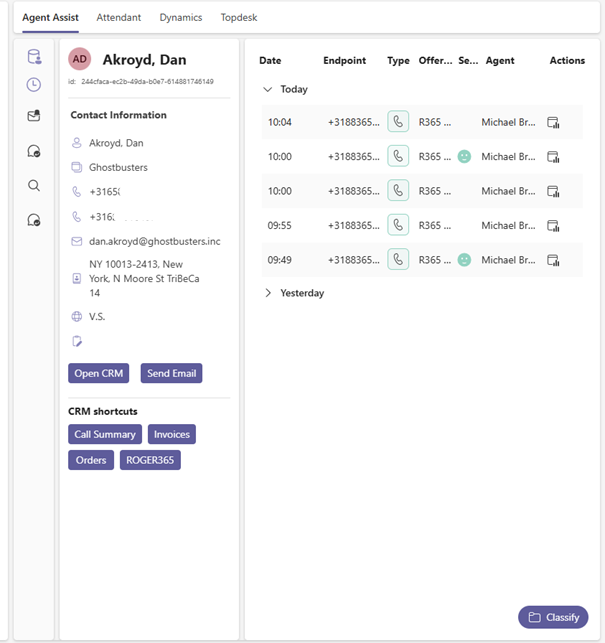
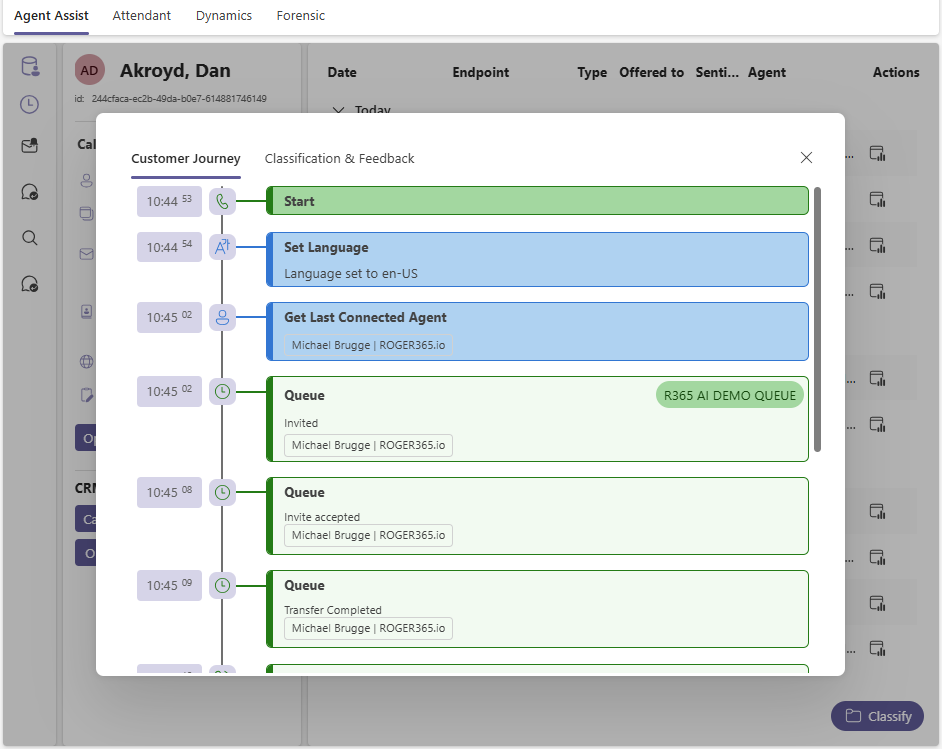
Agents can now see the complete story of a voice interaction before they even say hello. The Customer Timeline in Agent Assist shows routing decisions, queues the caller passed through, transfers, agent hunts, call classifications and AI-generated summaries including a Recap, Issue, Resolution and Narrative. Admins can enable this per Agent Assist profile, giving full control over who sees it.
Why it matters for you
The benefit
When agents have the full picture from the start, customers feel heard instead of frustrated. Full journey visibility reduces unnecessary transfers, shortens handling time and raises the quality of every conversation. It is the context agents always needed, now delivered automatically.
March brings another set of impactful updates that make everyday work in ROGER365.io smoother, smarter and more connected. Thank you for the ongoing feedback and enthusiasm, it continues to guide how we refine the platform for agents, supervisors and admins alike.
This month’s improvements focus on giving teams better context, faster responses and clearer insight into how interactions are handled across channels. From AI-powered summaries to deeper analytics, these additions help you deliver more consistent, personal and efficient customer experiences inside Microsoft Teams.
Here are March’s highlights:
Here’s to another month of streamlined workflows, better collaboration and smarter conversations with ROGER365.io.
Instant clarity for very WhatsApp and webchat conversation
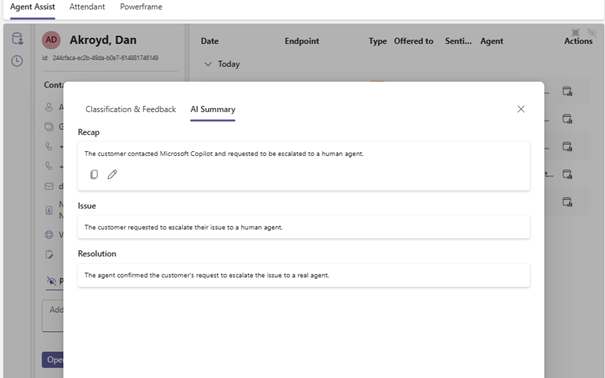
Agents can now see an AI‑generated summary of any social messaging conversation. Instead of scrolling through long threads, you get a clear, structured overview right when you need it.
Why it matters for you
The benefit
Faster context leads to shorter handling times and fewer repeated questions for customers. It creates smoother chat experiences and boosts customer satisfaction on WhatsApp, webchat and other social channels.
Incoming chats go straight to the right agent
Social messages from channels like webchat and WhatsApp can now be assigned to agents automatically. No more waiting for someone to manually pick them from the queue.
Why it matters for you
The benefit
Auto assignment reduces delays, shortens first response times and keeps conversations moving. It ensures every message lands with an available agent right away, improving both team efficiency and customer satisfaction.
Keep important customer details in one place
Agents can now save notes directly on a contact and choose whether they are personal or shared with the team. Notes stay linked to the contact, so the information is always available for the next interaction.
Why it matters for you
The benefit
Important customer information is never lost again. Shared notes improve collaboration and handovers, while personal notes help agents deliver more personal and efficient conversations.

See exactly how agents handle interactions
The Insights & Analytics module now includes a dedicated Agent Actions page. This new report gives a clear view of the actions agents take during and after conversations.
Why it matters for you
The benefit
Better visibility leads to better performance. With detailed action tracking, you can improve coaching, ensure compliance and highlight best practices all within your existing Power BI dashboards.

February brings another strong set of improvements that make working in ROGER365.io faster, smarter and even more intuitive. Thank you for the great feedback on our first monthly update. Your input continues to shape how we refine the platform for agents, supervisors and admins.
This month focuses on clearer insights, simpler workflows and more intelligent automation to help every user deliver better customer and employee experiences directly in Microsoft Teams.
Here are February’s highlights:
Here is to another month of innovation and smoother conversations with ROGER365.io
Smarter categorization, less manual work
Quickly understand what your customer interactions are about, without lifting a finger. The new AI Classification action automatically labels every call or message based on the conversation itself. No more manual tagging, no more inconsistent data.
Why it matters for you
What problem it solves
Manual tagging was slow, inconsistent, and easy to forget leading to gaps in reporting and unclear trends. Automated classification ensures every interaction is captured correctly, every time.
The benefit
Better insights, faster workflows, and more accurate reporting helping you improve service quality, optimize queues, and spot issues before they grow.
A clearer, faster way to see what matters
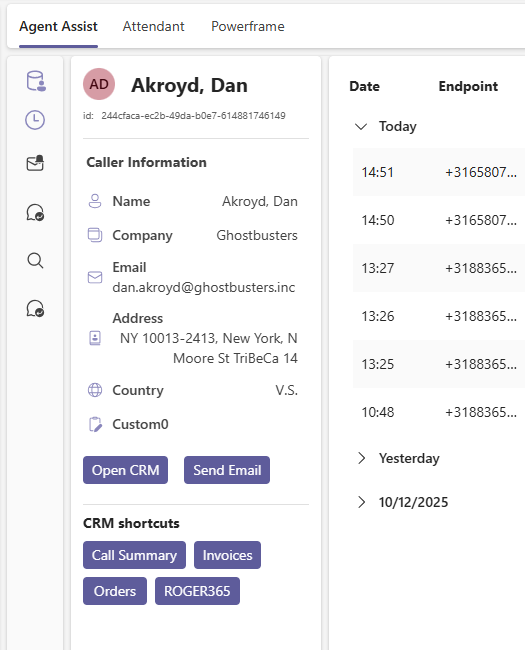
The Agent Assist panel has been redesigned to make key customer information easier to read and act on during live interactions. The refreshed layout helps agents quickly scan CRM details, past interactions, classifications, and insights. All without losing focus on the customer!
Why it matters for you
What problem it solves
The old layout could feel busy, making it harder to quickly find important customer details, especially during fast-paced conversations.
The benefit
A streamlined design reduces cognitive load, speeds up access to customer info, and supports shorter handling times. Better visibility leads to more personal conversations and higher first‑call resolution.
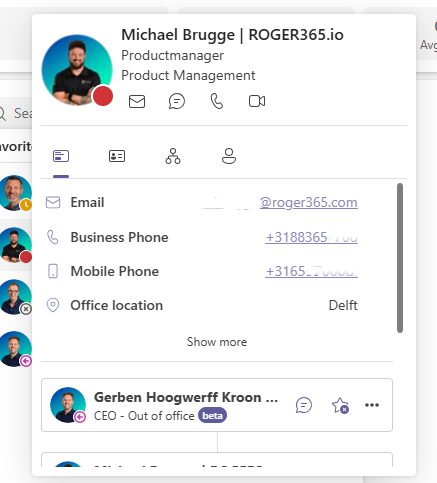
Customer details at a glance with faster ways to take action
The contact card has been redesigned to present customer information more clearly and make it easier to act during live interactions. Agents now see a cleaner layout with quick-action buttons for email, phone numbers, Teams chat, video calls, and office location. The card also shows a list of the contact's direct peers to give agents extra context.
Why it matters for you
What problem it solves
Older contact cards could feel cluttered, which slowed agents down when they needed to verify details or reference customer info during a call.
The benefit
One-click communication speeds up handling time and reduces unnecessary navigation between applications. Seeing peer contacts helps agents reach the right person quickly, resulting in shorter wait times and a higher chance of solving requests on the first attempt.
Add whole teams to Favorites with one click
You can now add every member of a group to your Favorites list instantly. After searching for a group in the Contact Center application, a new button labeled Add users to favorites appears. One click moves the entire group into your Favorites so you no longer need to add contacts one by one.
Why it matters for you
What problem it solves
Adding contacts individually was slow and discouraged agents from organizing their Favorites, especially when teams were large.
The benefit
This feature saves time, improves collaboration, and reduces customer wait times. A team of ten members used to require ten separate actions. Now it takes only one click to keep your Favorites organized and ready for fast responses.
Stay informed with in-app notifications
A new News button is now available in the Contact Center application. It gives you direct access to updates, announcements, and important information about new features and changes.
Why it matters for you
What problem it solves
Distributing updates through email or fragmented channels limited visibility. As a result, new capabilities and workflow improvements were not always adopted in time, leaving business value and ROI unrealized.
The benefit
The News button brings important messages into the application itself. This improves awareness, reduces support questions, and shortens training time. When users know what is new and why it matters, they work more confidently and productively, which leads to a better experience for both employees and customers.
Set up routing scenarios in seconds
You now have access to pre-built callflow templates that make it easy to set up common routing scenarios. Instead of building every flow from scratch, administrators can start from proven templates and customize them with the Graphical Call Flow Editor.
Why it matters for you
What problem it solves
Creating callflows manually takes time and requires expertise. Mistakes in complex routing can lead to inconsistent behavior and delayed deployments.
The benefit
Templates turn time-consuming configuration work into a quick setup. This reduces deployment costs, speeds up go‑lives, and ensures best practices are used across the organization. Common scenarios that used to take hours can now be implemented in just a few seconds.
As we wrap up an exciting year, the entire ROGER365.io team wants to wish you a happy and successful New Year!
We’re incredibly grateful for your trust and partnership throughout the past year. 2026 is shaping up to be another big one packed with innovative updates and powerful improvements across our platform. Our mission remains the same: to help you create seamless, intelligent customer experiences directly within Microsoft Teams.
And there’s more starting this January, we’ll be sharing monthly “What’s New” updates, giving you clear insights into the latest features, enhancements, and behind-the-scenes improvements we’re working on.
Here’s to a year full of innovation, collaboration, and great conversations.
From all of us at ROGER365.io, happy New Year!
The Wallboard feature has received new widget: Classification
This widget allows to track assigned Classifications during Voice and/or Social interactions. It gives helpful insight on how often agents are classifying their interactions with the customer and helps with tracking trends of specific Queue(s).
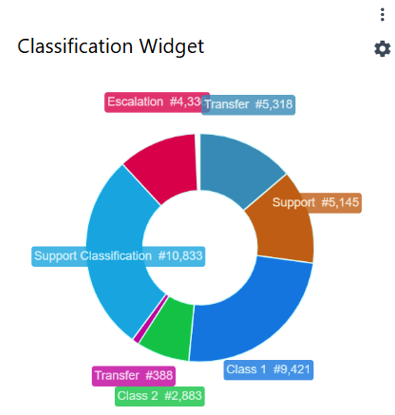
You can define how far back the Classification widget should look for data, how many classification items can be shown (the “Top N classifications” option),and the maximum number of characters to display for each classification label.
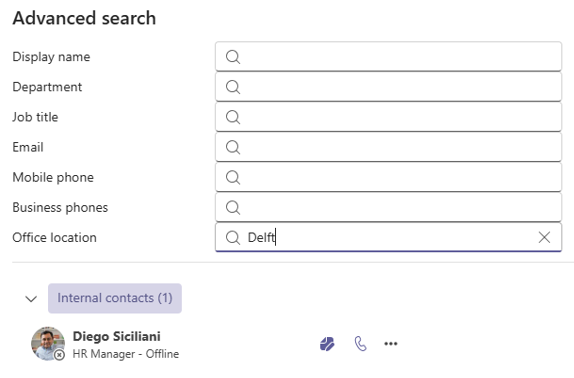
The Advanced Search feature has been enhanced with additional search property: Office location.
The Office location data comes from the user properties of Microsoft Entra ID (Active Directory) tenant, that means the office location set in Microsoft Teams won’t be taken into consideration while searching for specific contact.
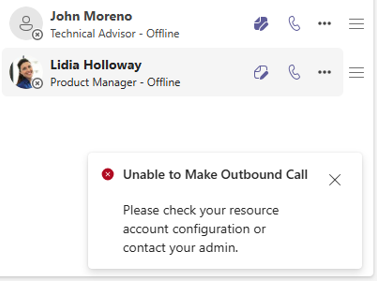
Up until now, agents using the Contact Center application were not directly notified when an outbound call failed, which could lead to confusion about whether the application was functioning correctly.
To address this,we have introduced a general notification that informs agents whenever an outbound call attempt fails.
As we move into the final stretch of the year, November has been a month full of exciting updates, smart improvements, and a continued focus on enhancing the ROGER365.io experience. In this edition we’ll walk you through the latest product updates.. Whether you’re a partner, customer, or simply curious about what’s new, here’s everything you need to know to stay ahead.
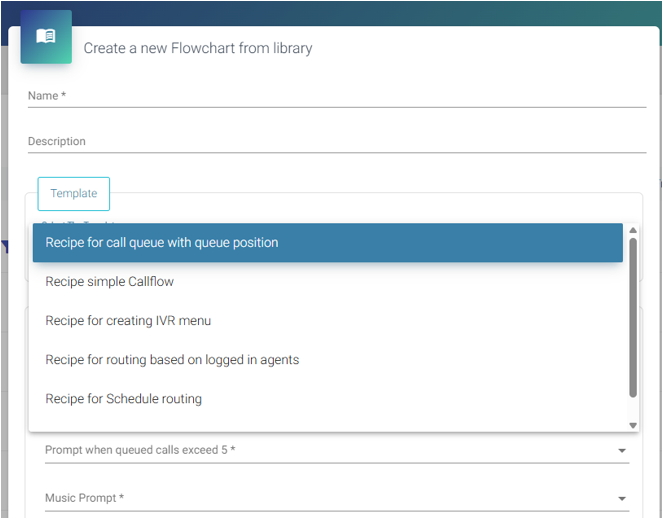
A nice new addition for ROGER365.io admins: we’ve added Template Callflows to accelerate onboarding and experimentation. These predefined callflows can be used out of the box, helping engineers explore product capabilities and expand their knowledge efficiently.
In the admin portal, select Contact Center | Callflows, then choose "+ Add flowchart from library". Here, you'll find the available templates:
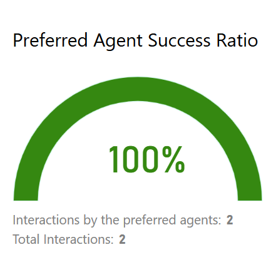
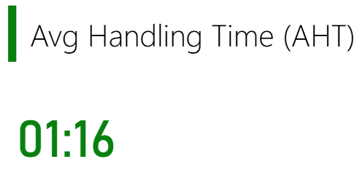
The Wallboard feature has received two new widgets:
This widget displays the percentage of interactions that were successfully routed to the same agent as in previous sessions. Below the main metric, you can find the total number of voice interactions, as well as the number handled by preferred agents.
The other new widget displays the average handling time (in minutes) for the selected voice queues. It helps quickly identify operational bottlenecks and ensure that agents handle interactions efficiently.
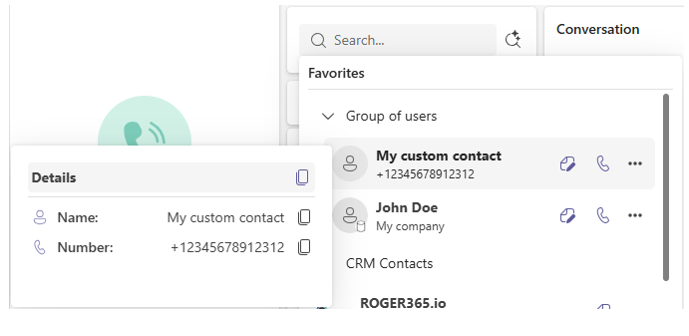
We’ve added the option to copy details of CRM or custom contacts. This new feature makes it easier and faster to work with contact information and helps improve your overall workflow.
Hover your mousepointer over the avatar icon to display the contact details. You’ll then see a copy button, which you can use to copy a single detail or all details at once:
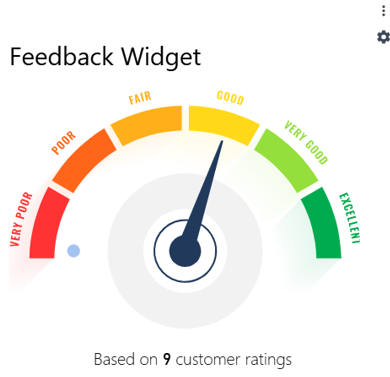
This new widget provides real-time insight into customer satisfaction by displaying the average post-call feedback score (on a 1–5 scale) gathered through DTMF input for selected Voice Queues. Ideal for wallboards and live dashboards, it helps contact centers monitor service quality at a glance and track how customers rate their experience after each call.
October brings crisp air and fresh momentum, building on September's innovations with even more powerful enhancements to the platform. After a productive summer recharge, we're accelerating delivery of features that optimize performance, deepen insights, and simplify complex workflows for your team. These updates reflect ongoing feedback, focusing on reliability and scalability to support your busiest seasons ahead. Expect continued excitement as we head toward year-end.
The Microsoft Shift Synchronization feature connects Microsoft Teams’ Shifts with the Voice Queueson the ROGER365.io platform. This makes it easy to set and align shift times for your team of agents, while still managing schedules within Microsoft Teams as the single source of truth.
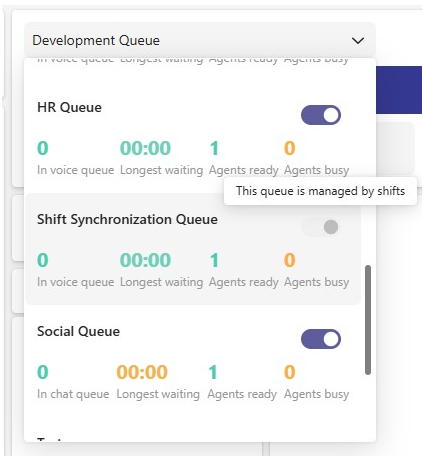
When the Shift Sync (Beta) feature is enabled, and an Agent in a Queue is matched to a corresponding Microsoft Teams user with a defined Shifts schedule, Microsoft Shifts becomes the primary source for managing that agent’s availability during their scheduled shift times. This means that when the agent is On Shift, their availability is controlled by Microsoft Shifts and not by manual status changes in ROGER365.io
After configuring (see documentation) the working schedules of Agents can be configured in Microsoft Shift:
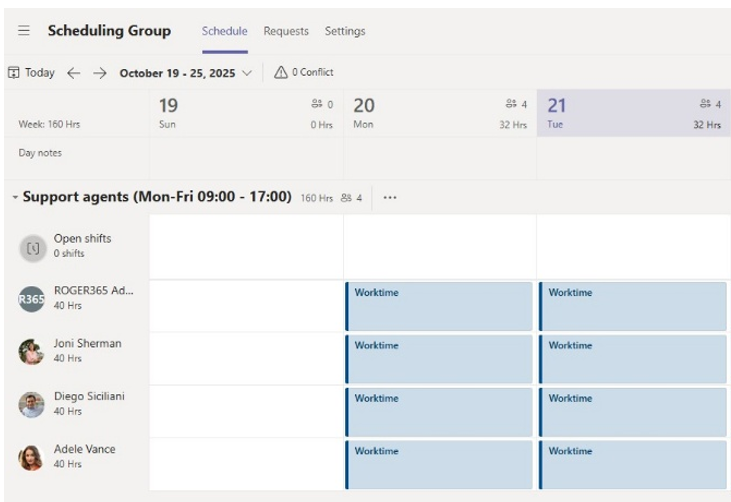
When an agent’s shift starts, they are automatically signed in to the Queue that has the Shift Sync feature enabled. Neither Agents nor Supervisors can manually log out from the Queue while their Shift is active (On-Shift flag).
In this release, the Agent App now has more configurable Powerframe tabs. This highly anticipated improvement allows to extend the workflow by adding for instance, favorite ticketing system, next to customer details.
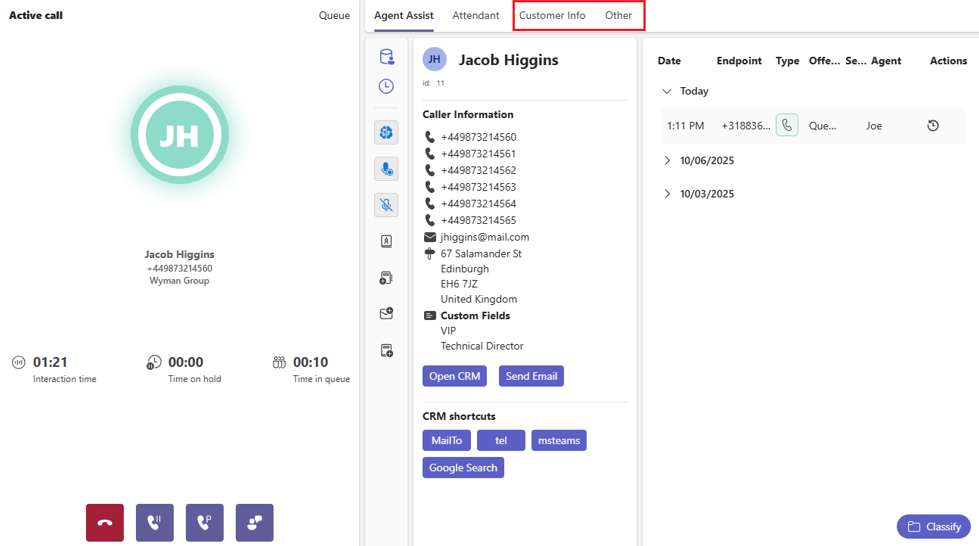
Agents can now initiate calls directly from WhatsApp conversations in the ROGER365 Agent App with a simple click. This option is available for customers using the OmniChannel feature available in our Enterprise subscription.
This feature makes handling hybrid messaging and voice interactions faster and more intuitive.
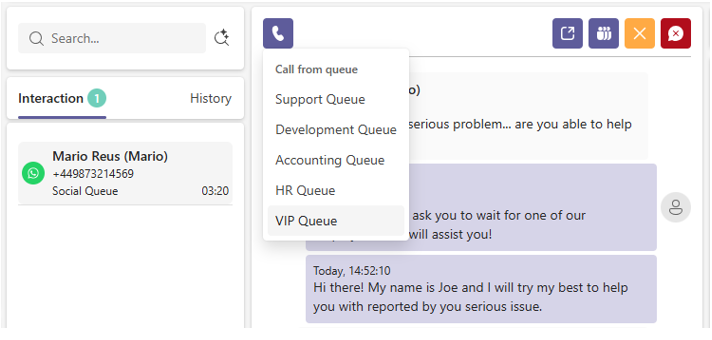
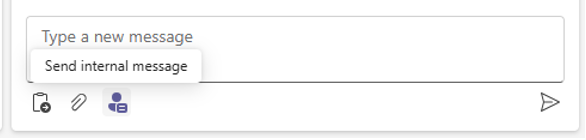
Agents can now request assistance from colleagues directly within any chat conversation in the ROGER365 Agent App.
Under the message field, there will be new button “Send internal message”:
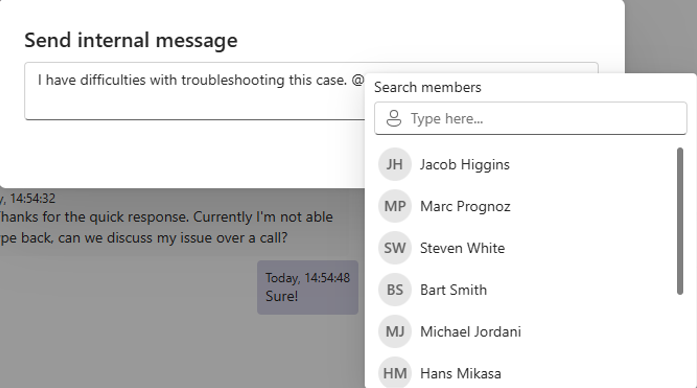
Typing the @ triggers a menu whereby you can select an internal Teams user to mention:
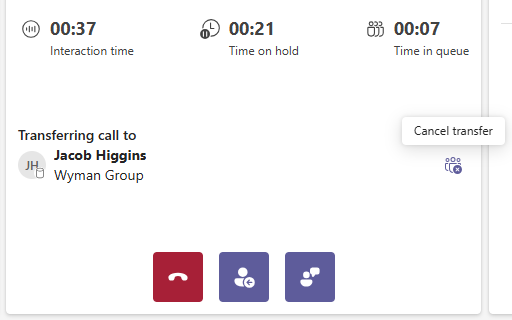
There are often situations where the consultative transfer has been made to the wrong person or selected person does not answer. An agent can use Cancel consultative transfer option to keep caller On-Hold which enables agent to plan further steps.
After performing a consultative transfer to the selected contact, an icon will appear next to the contact’s name with the label “Cancel transfer”
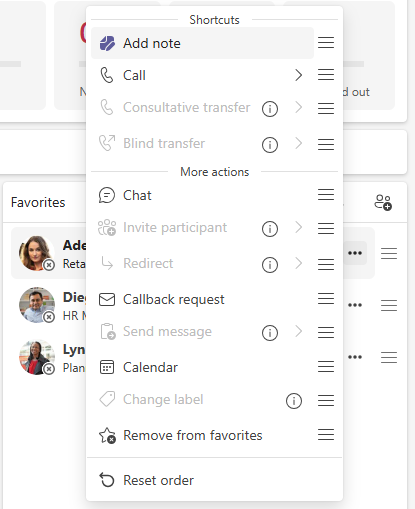
Depending on your activities in the app (whether you’re focused on calling or messaging) certain actions (icons next to your favorites) may seem unnecessary. In those cases, you can customize your shortcut actions by selecting which exactly buttons should be visible next to person’s name.
To set selected actions as the shortcut, drag & drop specific action from the More action section via ≡ icon into the Shortcuts. The informational icon next to grayed out action explains the reason behind unability to use this specific action.
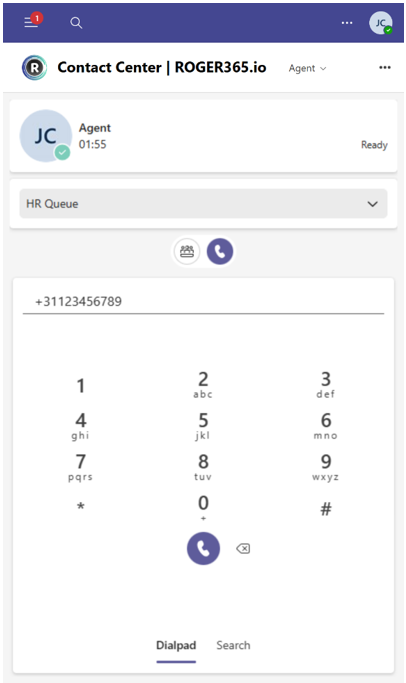
Following frequent requests, the mobile version of the Contact Center application received a significant update, now including outbound calling and Attendant features. This enhancement improves on-the-go communication and call management.
At the agent page, there will be two main sections (as the icons under the Queue selector):
September marks a fresh start, and we are excited to jump back in with a wave of new innovations across the ROGER365.io platform. After spending the summer refining ideas and exploring new possibilities, the focus now is on delivering smarter features that make your daily workflows easier and more efficient.
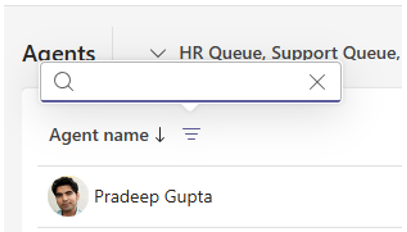
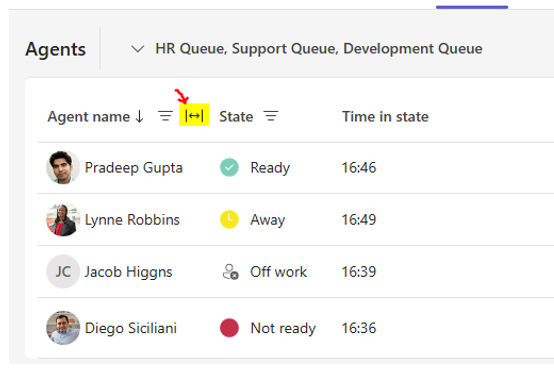
In this update,we've added the ability to sort, resize and search within columns of Agents overview at the Supervisor page, offering you more control and flexibility when viewing and organizing data.
To order, searchon or resize specific column, hover your mouse cursor over the name of column. Click 'Agent name' to reveal the sorting option:
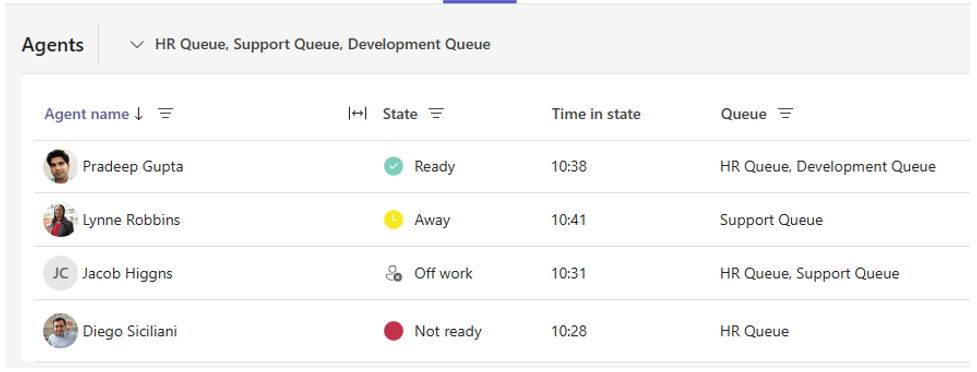
Clicking the filtering icon reveals the search option:
Hovering the title bar, reveals the resizing option:
We've enhanced the search option in the Agent App and Attendant console interface. This newfeature allows to search for Microsoft Entra ID users by their: Display Name, Department,JobTitle, UPN, MobilePhone.
In both search field in the ROGER365.io app, a magnifier icon will be visible. Clicking the icon will open the new search window where you can perform search on:
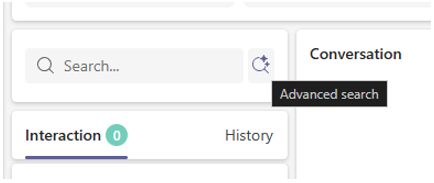
Attendant Console Interface
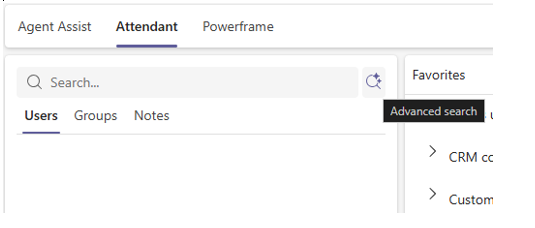
In the screenshot example below, we will be looking for all persons who works at HR department:
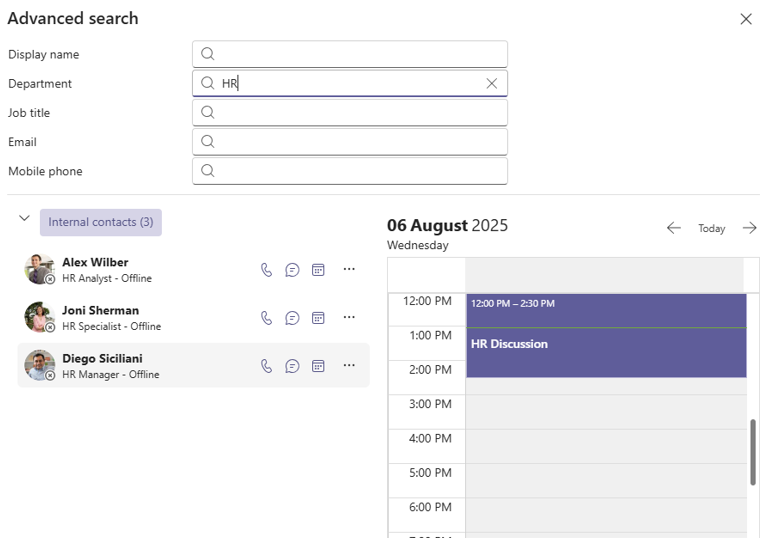
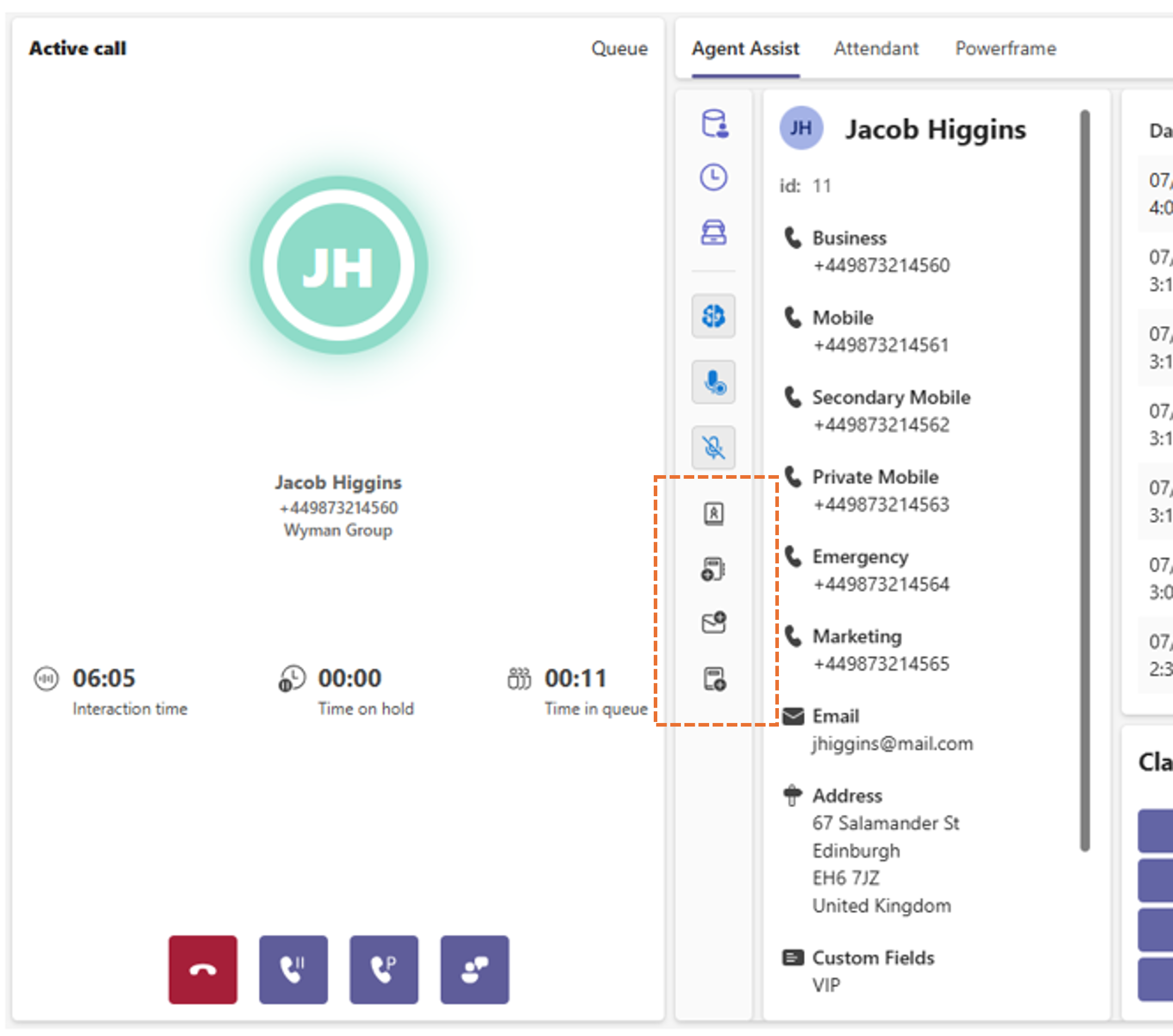
With this new feature, agents can make use of Action Buttons, providing quick access to desired URLs and improving overall efficiency. This is especially beneficial for fast-paced calling centers where time is of the essence, and shortcuts to critical resources can make a big difference. An administrator can add specific URL's to the action buttons which also can contain variables.
Examples:
After configuring, th action buttons will become visible in the Agent Assist bar:
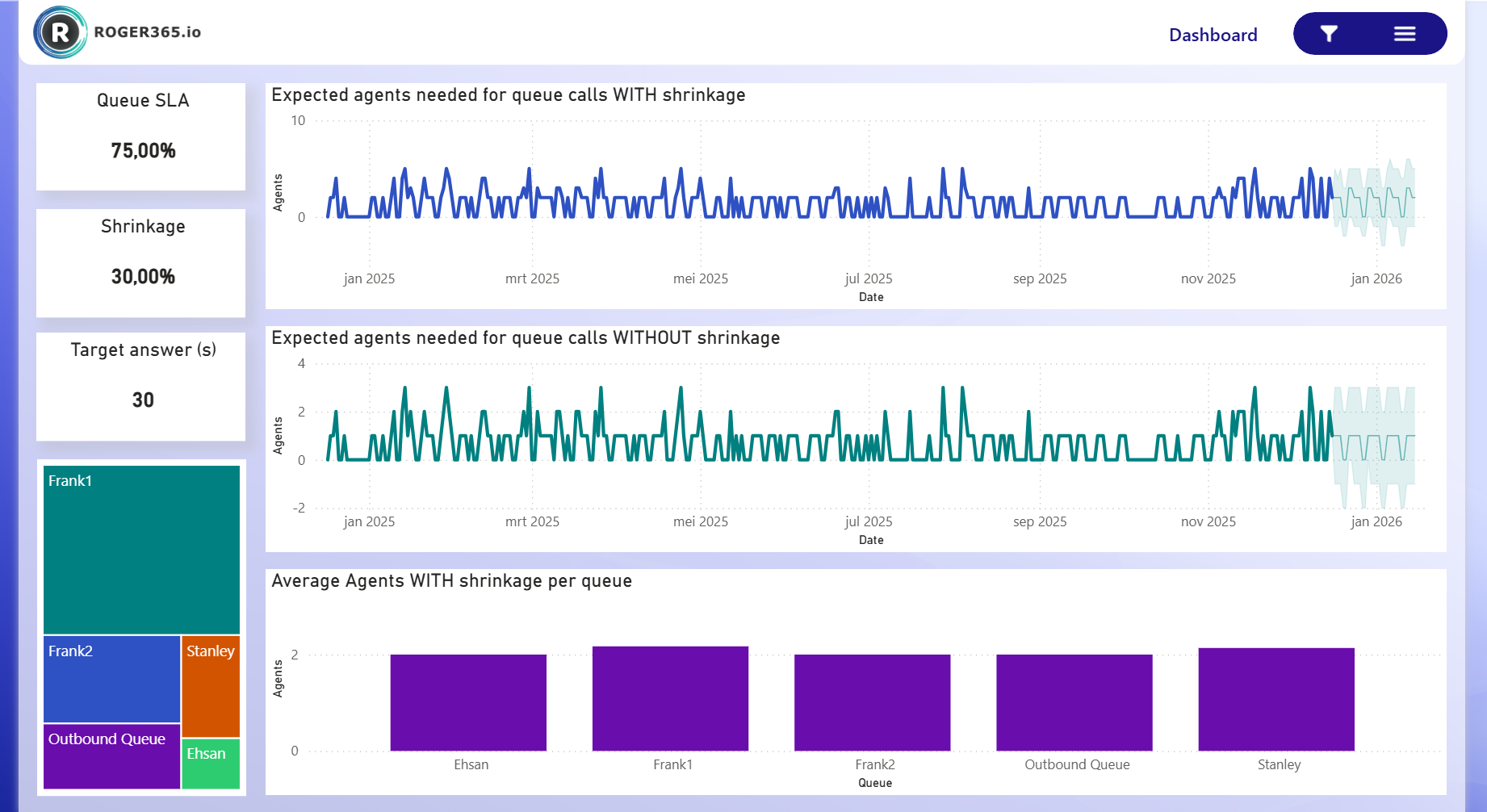
July Updates: Introducing Workforce Management Report Page!
Summer's peak season is in full swing, and ROGER365.io is supercharging your workflows with the new Workforce Management Report page! 🚀
This powerful addition makes it incredibly simple to access comprehensive insights into agent performance, queue efficiency, and resource allocation right in your platform. No complex setups required: just navigate to the page for real-time dashboards, customizable reports, and analytics that help optimize staffing and reduce bottlenecks during high-demand periods.
These enhancements are designed for seamless scaling, so you can focus on what matters most. Thanks for being part of the ROGER365.io community: let's innovate through summer together!
This new report provides an overview of key Workforce Management (WFM) metrics for the agents within Contact Center queues. Using the Erlang C formula, the dashboard estimates the number of agents needed to handle calls, includes adjustments for shrinkage, and measures queue service levels (SLA) and target response times for customers waiting on the line.
Deliver full interaction context with one click. Great for agent coaching, smoother follow-ups, and a seamless customer journey. Agents now see a clickable button next to past calls—unlocking a Customer Timeline with rich data like:
Give agents instant access to CRM and ERP actions, right inside the Agent Assist panel. CRM replicator profiles can now include up to 4 customizable action buttons. These buttons open external CRM/ERP pages in new tabs, prefilled with customer-specific data like email, company, or first name.
Example use cases:
June marks the official start of summer, and ROGER365.io is heating up with exciting new enhancements! 🌞
We’re introducing new exciting feature for ROGER365 Contact Center application Mappings (Beta)! This brand-new feature which is part of existing option Teams presence integration allowsportal admins to map either via Agents or Agent Profiles admin pages specificTeams status to one of available in ROGER365 Agent statuses:
Mapping Busy status can be very useful in case of Calendar events coming from Microsoft Outlook to notify ROGER365 that the calls should not be offered. Now ROGER365 will be waiting for the updates coming from Microsoft Teams presence to change an agent status in Contact Center according to configured Mappings.
Let’s take a lookat an example where agent Adele decides to change her status in Microsoft Teams from Available to Be Right Back
Agent Adele with Ready status in ROGER365 Contact Center application and Available status inMicrosoft Teams:
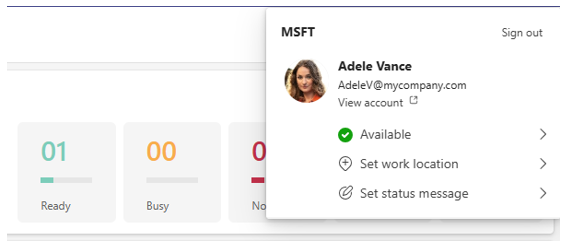
Agent Adele after changing Microsoft Teams Available status to Be Right Back:
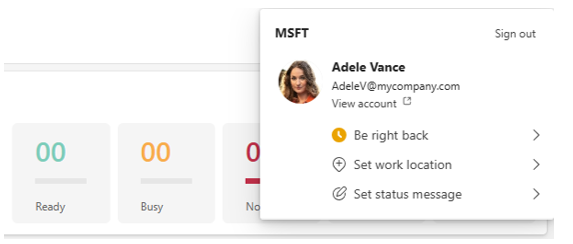
According to our Mappings configuration the agent status has been properly changed to Off work.
Tackle overloaded queues effortlessly with our new Intelligent Formal Activation feature. It automatically deploys extra agents when demand spikes, so saving precious time of supervisors.
This update empowers your team to scale dynamically.
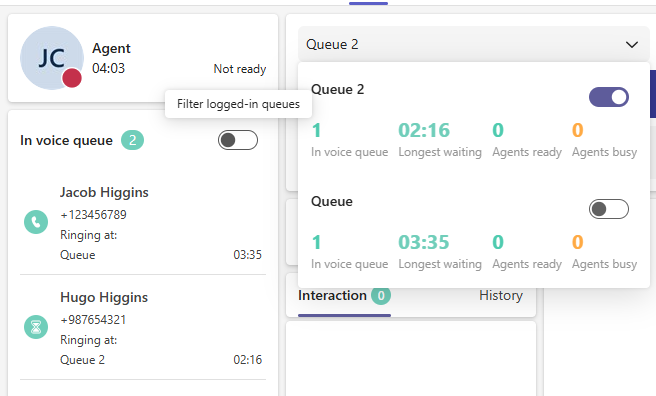
The Agent page does offer a functionality which allows an agent to hide calls that are waiting in Queues from which the agent is currently logged out. It helps provide a clearer overview of which calls should be handled by the agent currently logged into a certain Queue.
At the Agent page of Contact Center application next to a “In voice queue” label you can find switch with the tooltip description “Filter logged-in queues”.
May Updates: Powering Through Spring!
May is here, and with warmer days comes renewed energy at ROGER365.io! ☀️
This month, we're delivering updates that enhance collaboration and streamline your daily operations, turning feedback into features that truly make a difference. From refined interfaces to smarter automation, these improvements are designed to keep you ahead of the curve.
Thank you for your ongoing support, let's make the most of May together!
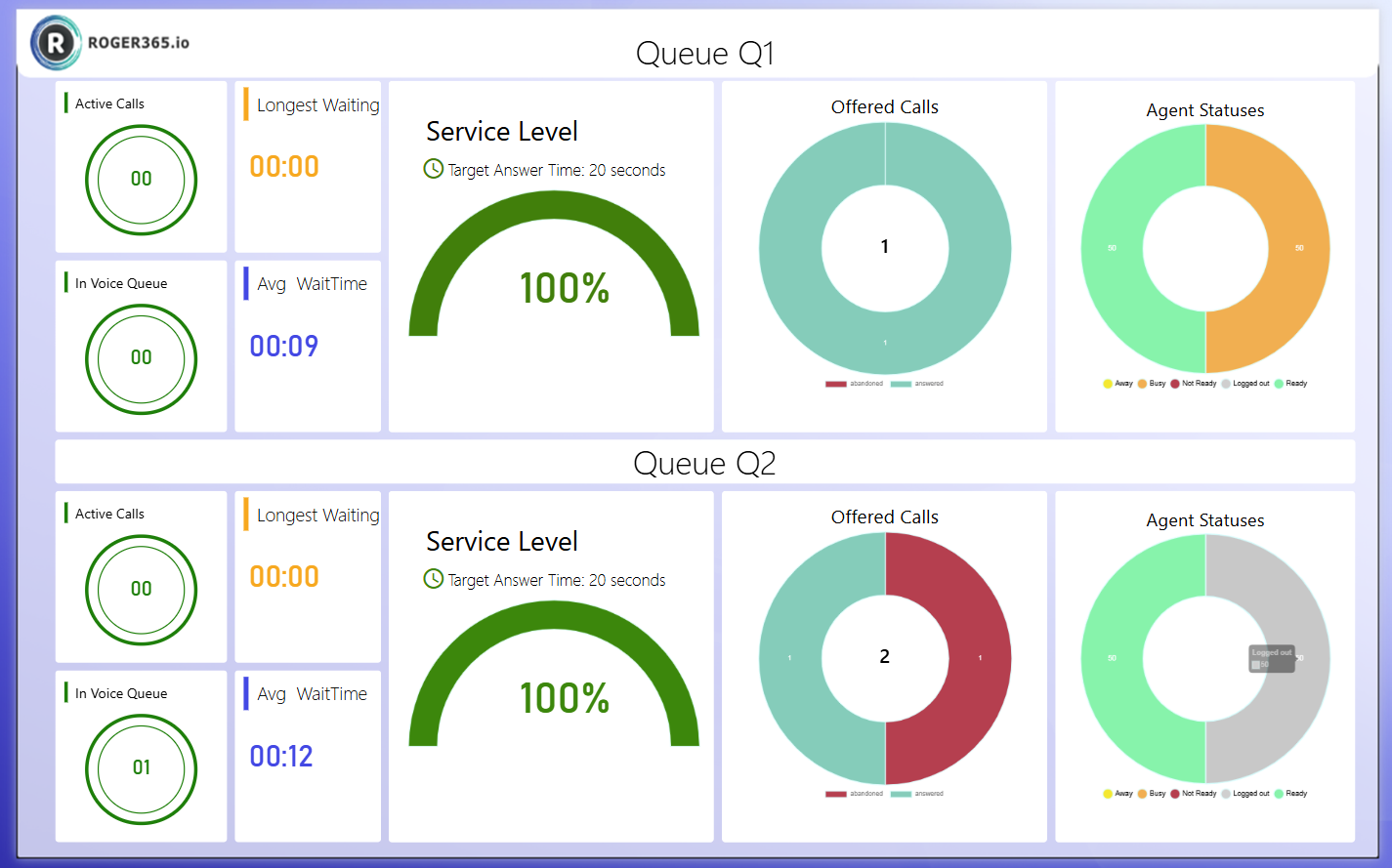
Wallboards provide real-time visual dashboards that display key contact center metrics such as queue status, agent availability, service levels, and call statistics. These customizable screens help teams and supervisors monitor performance at a glance, enabling quick decisions to maintain service quality.
Wallboards can be configured through an easy drag-and-drop interface to highlight the most relevant data for different teams or situations. By displaying live statistics on large screens in the office or remotely, wallboards promote transparency, team collaboration, and awareness of ongoing contact center activity. This helps improve responsiveness and operational efficiency while keeping everyone aligned on service goals.
Every Business and Enterprise subscription have 1 Wallboard license included. Per one Wallboard license you can have 3 active sessions.
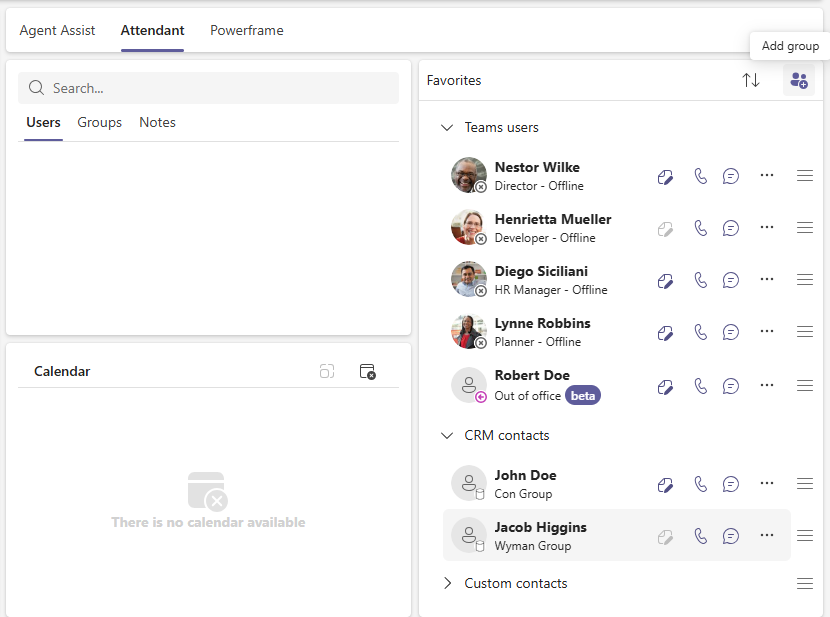
This new options allows you to create groups of favorite contacts. This feature is really helpful to organize contacts in defined manner. Favorite contacts which are not part of any group can be dragged into one by using ☰ icon (drag & drop action). Groups can be collapsed and opened using > or ˅ signs. When certain group is collapsed it is possible to change its name, rearrange order or remove entire group.
By clicking the 'Add Group' icon a new group can be created:
April showers bring more than flowers, they're fueling fresh growth at ROGER365.io! 🌸
As we embrace spring, our team is rolling out enhancements that make your platform experience even more dynamic and efficient. This month's updates build on your feedback, introducing streamlined workflows and innovative tools to supercharge your productivity.
We're grateful for your continued partnership and can't wait to hear your thoughts on these latest improvements!
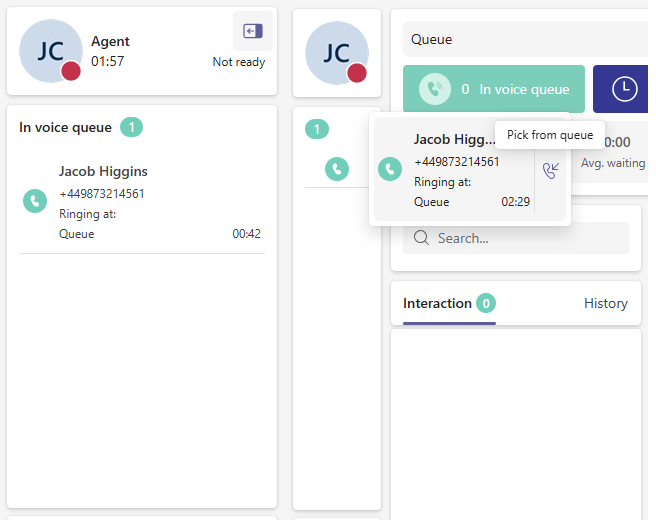
An agent is able to enlarge its working space by collapsing the left side of an application which is responsible for seeing incoming calls or waiting for response conversations. This can be done by pressing on the icon in the top left corner of Agent information.
When left panel is collapsed, to answer incoming call or accept conversation, press using left mouse button on the record. Now you can use either “Pickup from the queue” button (visible after hovering mouse over the record), or by pressing right mouse button on the record.
Earlier this year, we introduced the new Insights & Analytics module for calls. Now we also report social interactions like, chat. This report provides an overview of social interactions, displaying metrics such as total interactions per type, average interaction time, and statistics over a period of time:
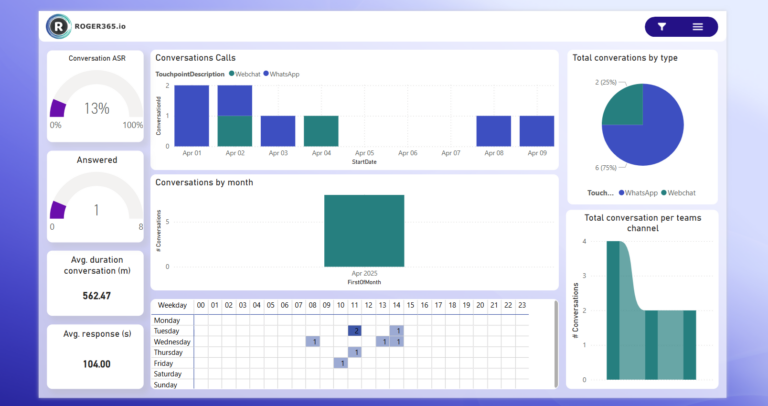
This option is only availble on the Enterprise subscription, as this this subcription supports omnichannel/social messaging.
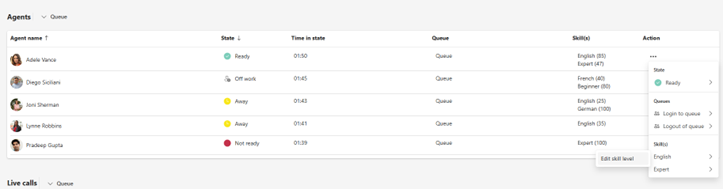
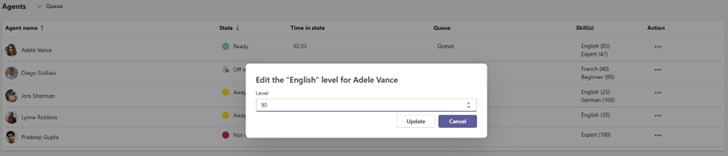
This feature allows supervisors to edit an agents' skill without requiring access to the Admin portal. A supervisor once need to get the permission to change a skill.
On the supervisor page, go the agent section. Then press the three dots in the Actions column. In the submenu you'll find the Skills section.
Each section of the Supervisor tab can be moved around or collapsed on agent’s demand. This feature is useful for the agents who prefer to have most important information on top of the tab and/or collapse not needed ones.
To “Collapse” or “Move” certain section, an agent should press, or press and hold highlighted buttons at the far-right side of specific section:
The Phonebook configuration of the CRM Replicator received update for the phone. This change will improve existing situation where each configured phonenumber is presented as “Phone”. In the admin portal the labels can be configured and are reflected in the Agent App:
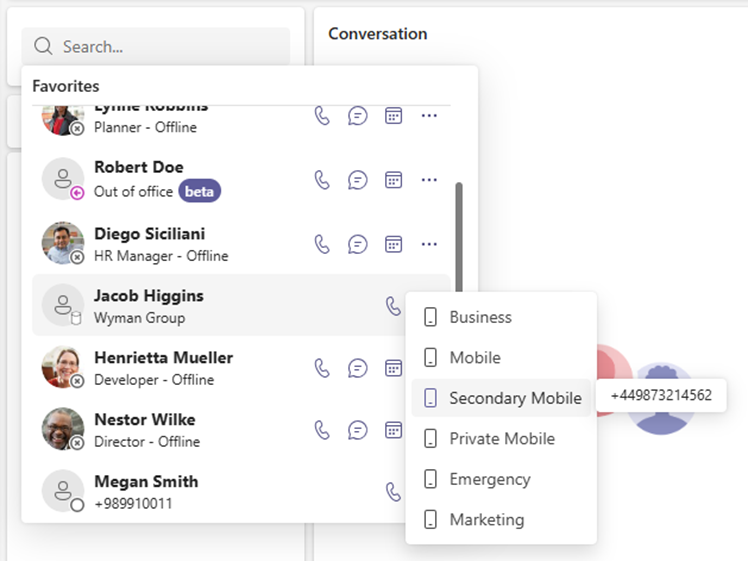
Spring is around the corner, and things are blooming here at ROGER365.io! As we move into March, our focus remains on continuous improvement delivering smarter, faster, and more seamless ways for you to connect and collaborate through our platform.
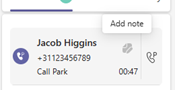
This functionality may be useful for Attendants where the Parking feature is used often, especially in case of handing a call to different agent from the same park group.
To use this feature, hoover mouse cursor over the parked call to see “Add Note” button:
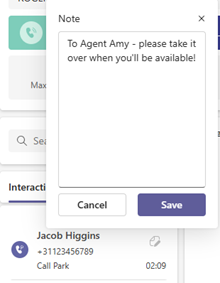
After pressing the “Add Note” button, you’re able to set the custom note:
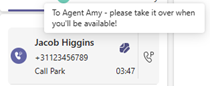
The note is now visable for everybody within the same park group:
As promised, we’re kicking off our monthly updates and February is already bringing exciting improvements to the ROGER365.io platform.
Our team has been hard at work refining existing features, improving performance, and laying the groundwork for some bigger innovations to come later this year. This month’s highlights include several usability enhancements, smarter integrations, and new tools designed to help you get more out of every interaction.
Stay tuned as we continue to roll out fresh updates every month, keeping you informed about the latest improvements and giving you a peek at what’s next for ROGER365.io.
We are thrilled to introduce a new, advanced reporting solution for ROGER365.io. Next to the native Reporting tab integrated in the Agent App we now offer a extensive, more advanced reporting solution, based on Microsoft PowerBI.
This PowerBI report provides key insights into your Contact Center’s performance, covering Calls, Queues, and Agents. The reports allow you to track various metrics, understand call handling efficiency, and monitor agent productivity.
The module consists of multiple reports and here you'll find a few of them:
Dashboard
This page offers a comprehensive overview of key performance indicators (KPIs) for the Contact Center. You can view metrics such as total calls, answer rates, average interaction time, and average ring time, helping to monitor the overall performance of the Contact Center.
Calls Summary
This page provides an overview of all call-related metrics, including answered calls, average interaction times, and the overall call answer-seizure ratio (ASR). It offers insights into the total number of calls handled, as well as detailed breakdowns of call volumes over specific time periods. This page is essential for tracking call center performance and identifying trends in call handling efficiency.
Calls Volume Analysis
This page analyzes call volume patterns by different timeframes. It provides insights into call distribution across weekdays, as well as detailed breakdowns of calls by specific numbers, offering an understanding of peak call times and trends
This module is available as an add-on on our Business and Enterprise subscriptions. You can find the full description on our documentation page: https://doc.roger365.io/documentation/configuration/insights-analytics/
In many contact centers, a supervisor has the option to monitor, whisper or join an agents' active call. Mostly this is hidden from an agent, but in some cases you do want the agent to know that a supervisor has joined the call. With the 'Show supervisor in roster' option, you can enable this and display the name of the supervisor in the agents' interface:
With the new Queue Service Level feature offers insights into the effectiveness of call handling across different queues. You can configure a time in seconds within a could should be answered and threshold percentage to configure a performance indicator which reflects the ratio of calls being handled within the specified time frame.
On the supervisor page the following is be visable:
On the reporting tab the level is displayed on the queue summary page:
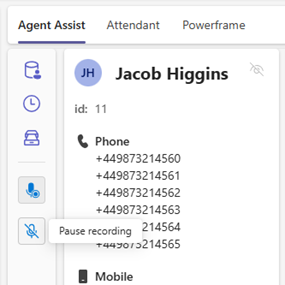
If you're using the voice recording integration with ClarifyGo, you are now able to pause and resume callrecording during a call. In some cases this is mandatory, when a caller is sharing personal data and you don't want to record this information. The option to pause/resume is part of the Agent Assist feature.
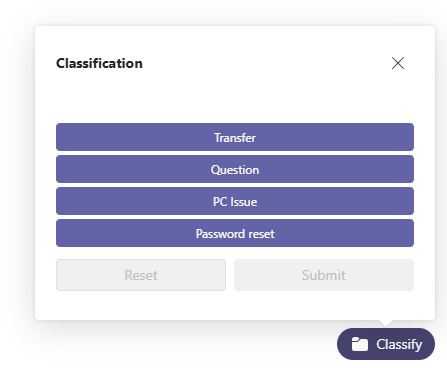
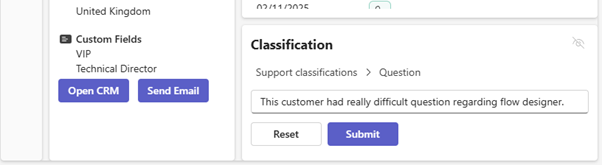
Agent Assist’s Classification has been improved with new functionality: Remarks. Useful option forleaving internal note of specific customer interaction for yourself or other agents.
During an interaction enter a remark. You can enter up to 2048 characters.
As we wrap up an exciting year, the entire ROGER365.io team wants to wish you a happy and successful New Year!
We’re incredibly grateful for your trust and partnership throughout the past year. 2025 is shaping up to be another big one packed with innovative updates and powerful improvements across our platform. Our mission remains the same: to help you create seamless, intelligent customer experiences directly within Microsoft Teams.
Here’s to a year full of innovation, collaboration, and great conversations.
From all of us at ROGER365.io, happy New Year!
Agent Assist in ROGER365.io gives contact center agents instant context and smart AI support right inside Microsoft Teams, so they can resolve issues faster and deliver more personal conversations. It brings CRM data, customer history, classifications, and AI-powered summaries together in one clear view during every call or chat.
Agent Assist is a native Teams experience that augments the ROGER365.io contact center with an extra pane of live customer insights and actions for the agent. Once enabled for an agent profile, it automatically appears during interactions and shows the most relevant information for that specific caller or contact.
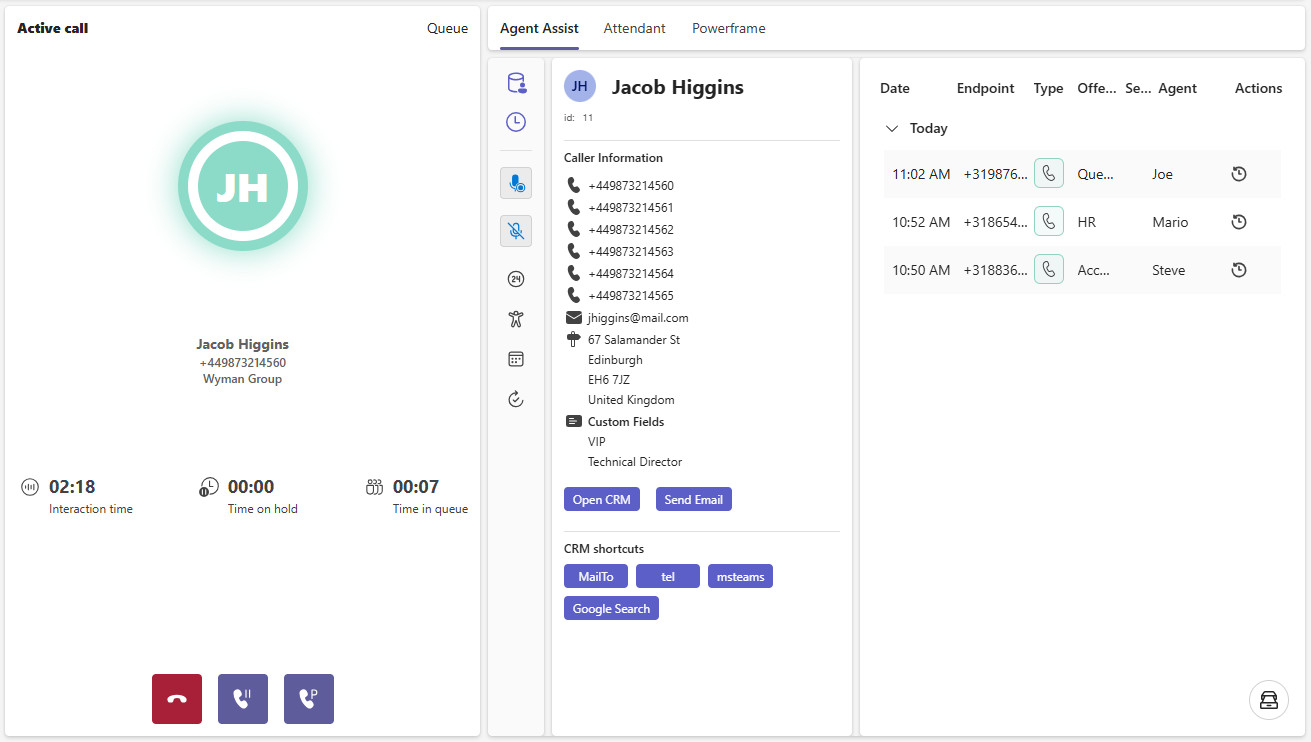
During a conversation, Agent Assist can display key CRM or ERP data such as customer details, open tickets, and recent activity, all aligned to the caller’s number or ID. With one click, agents can jump straight into the full customer record in systems like Salesforce, Dynamics 365, AFAS or other connected platforms.
The Timeline view provides a consolidated customer journey, including previous voice calls, WhatsApp messages, IVR choices and which agents handled earlier contacts. This gives agents immediate understanding of context and promises made, reducing repetition for the customer and helping to prevent dropped follow-ups.
Agent Assist uses integrated AI to generate concise conversation summaries that agents can quickly review, edit and reuse in CRM notes, tickets or follow-up workflows. Call classification and routing information are also visible, so agents and supervisors can better understand interaction types and optimize processes over time.
By surfacing everything an agent needs in a single, configurable view, Agent Assist cuts down on screen switching and manual note-taking. The result is shorter handling times, more consistent after-call work, and a smoother, more personal experience for every customer who contacts your organization.
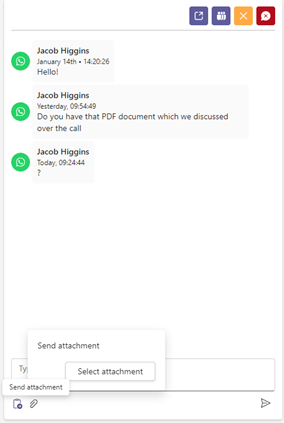
Many customers are using our Hybrid Queue solution to handle their incoming WhatsApp conversations. In some cases, you would like to send a file to your customer, for example to send a PDF file. This was already possible via the Teams channel, but now you're also able to send it directy from the ROGER365.io agent interface.
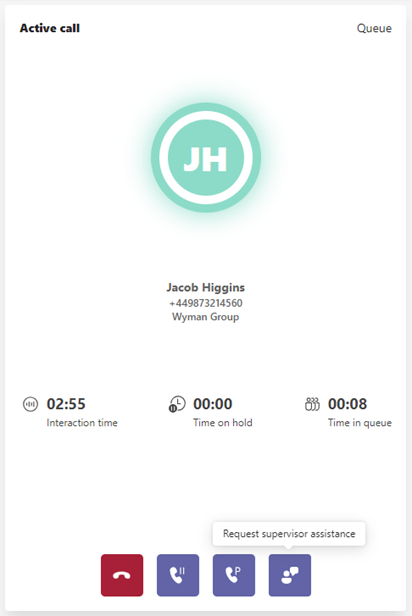
When an agent needs help from a supervisor during a conversation, they can now instantly notify Supervisors when their expertise is needed, ensuring faster resolutions and improved customer service.
During a conversation, a 'Request supervisor assistance' button is available:
Upon pressing the button, three options will be shown:
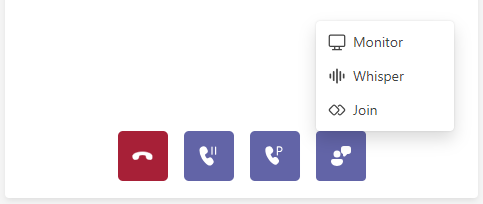
Selecting one of these options will send a parallel invite to join the call to every available Supervisor at the moment. There’s a seat for only one Supervisor per call, so the first one to join wins the seat. It isn’t possible for the second Supervisor to join a call, even if the previous Supervisor has left.
This feature is available in the Business and Enterprise subscription.
Call classification is a feature that allows agents to categorize the outcome or type of each call or interaction. Agents can select classifications during or after a call, such as marking whether the issue was resolved, if a callback is needed, or identifying the nature of the call (e.g., sales, support, inquiry). This information is stored and will be visible via our Insights & Analytics module, or you can retrieve the information via our API.
With this information you can get a good overview of what the nature is of conversation which are handled through the ROGER365.io contact center. This feature is available in the Business and Enterprise subscription.