

What's new
UnifAI™ platform updates
Discover the latest ROGER365.io updates, new features and other interesting information that boost productivity, reduce repetitive work, and make your day easier, faster, and more rewarding.



Fill in this form to request a call with Michael!
Discover the latest ROGER365.io updates, new features and other interesting information that boost productivity, reduce repetitive work, and make your day easier, faster, and more rewarding.
This month is all about the agent’s everyday experience, with new ways to personalise your workspace, keep track of the people you speak with and stay up to date with what’s new. Thank you to our community for continuing to share your feedback and help shape these updates.
Our focus this November is on giving agents more context and flexibility at the moment it matters most.
Here are November's highlights:
Here is to another month of smarter, more personal conversations with ROGER365.io.

See what's new without leaving your screen
UnifAI now has a What's New button. It shows the latest features and changes right inside the product, so you never have to go looking for them.
Why it matters for you
The benefit
When updates are easy to find, they get used. This small addition helps reception teams make the most of new features as they arrive, cutting down on missed capabilities and extra training messages.

Your workspace, arranged your way
The Agent App now works like a browser, with tabs you can create yourself. Drag and drop your widgets onto the tab where you want them, so everything sits exactly where you need it.
Why it matters for you
The benefit
A tidier, personal setup means agents spend less time hunting for the right widget and more time on the call itself. This is especially helpful on smaller screens, where space is tight and every second counts.
Never forget how a colleague likes to be reached
Attendants can now add notes to a contact they transfer calls to. Choose Shared, so the whole reception team can see it, or Private, so it stays just for you.
Why it matters for you
The benefit
Knowledge about colleagues no longer lives on sticky notes or in someone's memory. Shared notes mean every attendant works from the same information, so callers reach the right person faster and fewer transfers go wrong.
Welcome to the very first UnifAI update. This month is all about introducing UnifAI Attendant Console for Microsoft Teams Phone, so you can see what it does and how it works in practice.
Here are October's highlights:
Thank you for being part of UnifAI from day one. Share your feedback with us and help shape what comes next.
The complete attendant console for Teams, built for receptionists, front desks and operators who need to handle busy call peaks quickly and calmly, while giving every caller a professional welcome.
UnifAI Attendant Console is now fully released for Microsoft Teams. Receptionists get a complete agent app with AI call summaries, live transcription that shows who said what, and CRM contact details that appear before they even pick up. Admins get a full portal for designing callflows, setting schedule-based routing, connecting major CRMs, and keeping an eye on usage, all from one place.
Why it matters for you
The benefit
This release turns scattered Teams calling and bolt-on tools into one proper attendant solution. Agents handle calls faster and with more confidence, admins configure once instead of juggling systems, and supervisors finally see what is really happening across the queue. The result is shorter calls, fewer mistakes, and customers who feel recognised from the first word.
Calendar integration: check availability at a glance
Call control: answer, hold and transfer with one click
Contact search: find the right colleague in seconds
Call parking: park a call, pick it up anywhere
Transfer to voicemail: no caller left unheard
Transfer: warm or blind, always smooth
Catch up on any call, mid-conversation, in seconds
Long calls can be hard to follow, especially when you step in partway through or need to hand one over. UnifAI now builds a live summary while the call is still happening, so you always know what has been said so far.
The summary updates as the conversation goes, pulling out the key points without you lifting a finger. No more scribbled notes or asking the caller to repeat themselves.
Why it matters for you
The benefit
Mid-call summaries keep everyone on the same page, literally, while the conversation is still live. Handovers become smoother, calls get resolved faster, and callers stop getting asked the same question twice. For busy teams juggling multiple calls at once, that means fewer mistakes and a noticeably calmer, more professional experience for the customer.

See who you're talking to, without leaving the call
UnifAI now pulls contact details straight from Entra ID and shows them on the caller's card. Job title, department and other directory info appear automatically, right where agents are already looking.
Why it matters for you
The benefit
Agents handle calls faster because the right information is already on screen, not buried in another app. Callers get recognised quickly and greeted properly, which makes every interaction feel more personal and professional. For the business, it means fewer lookup delays and directory data that's always accurate, straight from the source.
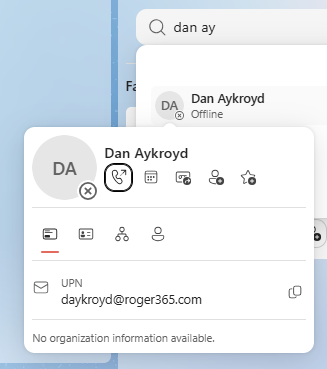
Follow up on every customer, with one click
Customers don’t always get an answer in the first interaction, whether it started with a call or another channel. With Callback Request, an agent can send the contact a request for a callback straight away, so follow-up actions start easily and customer engagement stays strong.
Send callback requests the way that suits your team: by email from a shared mailbox or as a pre-filled mailto link that goes out under the agent’s own name and signature.
Whichever you choose, every follow-up is quick to send, consistent in tone and easy to keep track of.
Why it matters for you
The benefit
Follow-ups no longer depend on someone remembering to write the right message. Agents spend less time on post call administration and more time with customers, and customers feel looked after because the follow-up arrives promptly and speaks to them personally. The result is a more consistent, professional service where every promise of a callback is easy to make and easy to keep.
Callback request: never let a follow-up slip through
